Manual.ly Logo

SpeaKa Professional SP-MM-940 Handleiding

0,0 · 0 Beoordelingen

PDF handleiding · 8 Pagina's

Nederlands

M: QW-35-FL
pagina

/ 8

Loading...
debdc7977ee6253abf6b500e83af45c8c336 page 3
3
Safety Instructions
Monitor Holder with Multiport Hub
Item no: 2731204 (SP-MM-800)
1 Intended use
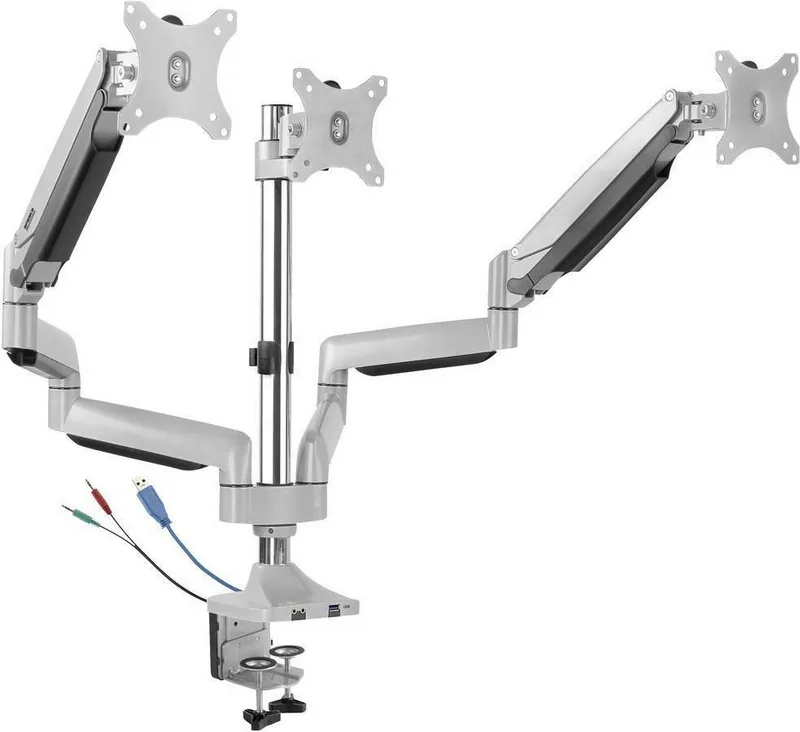
The product is a spring loaded three monitor arm with integrated hub. It secures to your table
using a clamp.
The product is intended for indoor use only. Do not use it outdoors.
Contact with moisture must be avoided under all circumstances.
If you use the product for purposes other than those described, the product may be dam-
aged.
Improper use can result in short circuits, fires, electric shocks or other hazards.
The product complies with the statutory national and European requirements.
For safety and approval purposes, you must not rebuild and/or modify the product.
Read the operating instructions carefully and store them in a safe place. Make this product
available to third parties only together with the operating instructions.
All company names and product names are trademarks of their respective owners. All rights
reserved.
2 Delivery contents
■
Product
■
Operating instructions
3 Latest product information
Download the latest product information at www.conrad.com/downloads or scan the QR
code shown. Follow the instructions on the website.
4 Description of symbols
The following symbols are on the product/appliance or are used in the text:
The symbol warns of hazards that can lead to personal injury.
The symbol warns of dangerous voltage that can lead to personal injury by elec-
tric shock.
5 Safety instructions
Read the operating instructions carefully and especially observe the safety
information. If you do not follow the safety instructions and information on
proper handling, we assume no liability for any resulting personal injury or
damage to property. Such cases will invalidate the warranty/guarantee.
5.1 General
■
The product is not a toy. Keep it out of the reach of children and pets.
■
Do not leave packaging material lying around carelessly. This may become dangerous
playing material for children.
■
If you have questions which remain unanswered by this information product, contact our
technical support service or other technical personnel.
■
Maintenance, modifications and repairs must only be completed by a technician or an
authorised repair centre.
5.2 Handling
■
Handle the product carefully. Jolts, impacts or a fall even from a low height can damage
the product.
5.3 Operating environment
■
Do not place the product under any mechanical stress.
■
Protect the appliance from extreme temperatures, strong jolts, flammable gases, steam
and solvents.
■
Protect the product from high humidity and moisture.
■
Protect the product from direct sunlight.
■
Do not switch the product on after it has been taken from a cold to a warm environment.
The condensation that forms might destroy the product. Allow the product to reach room
temperature before you use it.
5.4 Operation
■
Consult an expert when in doubt about the operation, safety or connection of the
product.
■
If it is no longer possible to operate the product safely, take it out of operation and pro-
tect it from any accidental use. DO NOT attempt to repair the product yourself. Safe op-
eration can no longer be guaranteed if the product:
– is visibly damaged,
– is no longer working properly,
– has been stored for extended periods in poor ambient conditions or
– has been subjected to any serious transport-related stresses.
5.5 Connected devices
■
Also observe the safety and operating instructions of any other devices which are con-
nected to the product.
5.6 Installation location
■
Select an installation location for the monitor holder and any supplied accessories that
facilitates safe and ergonomic use.
5.7 Before assembly and installation
■
Verify that the delivery content is complete before assembling the monitor holder and ac-
cessories. Do not assemble if any parts are missing.
■
Prevent damage to the monitor. Refer to the manufacturer instructions that came with
the monitor to find out how and where to attach a monitor holder or monitor mount.
■
Handle the monitor and screen with care. Always lay the monitor flat and use a pad or
cloth to protect the table surface and monitor from damage.
■
Risk of injury and/or damage when unpacking the spring loaded arm! Hold each spring
arm together while someone else cuts the zip tie. Slowly release the pressure on the
spring arms and open slowly to full length.
5.8 Table mounting
If you mount the monitor holder on a table:
■
Attach the monitor holder only to a sufficiently stable, horizontal table top. Tables made
of glass, ceramic or stone slabs or thin plastic-coated wooden-fibre slabs, are categoric-
ally unsuitable for attachments. Furthermore, you must not attach the monitor holder to
shelves or similar unstable or unsteady surfaces.
■
Attach the monitor holder only at a position on the table top that is suitable for this pur-
pose. Consider the significant lever action involved!
■
The weight of the monitor and monitor holder as well as its fixed position and significant
lever action can all cause pressure marks on the table top. For this reason, we do not re-
commend that you mount it on valuable furniture items!
■
For safety reasons, the monitor holder and the monitor that is attached to it should be
situated only above the table surface. The design of many monitor holders means that it
is not suitable for the monitor arm to be situated anywhere other than above the table
surface. There is also a danger of it toppling over in certain circumstances!
■
Ensure that the monitor holder is fixed to the table top securely. Otherwise it could slip
off the table top when you are moving the monitor and the monitor holder. As well as
causing material damage, this poses a danger of personal injury!
5.9 Removing a monitor
■
Risk of injury and/or damage from spring loaded arm! Before removing an attached mon-
itor, always set the front arm to the highest position so it cannot "spring up" after the
monitor is removed.
6 Maintenance
■
Adjusting the positions of the monitor and the monitor mount can cause the screws to
become loose over time. Check all the screw fittings from time to time.
7 Cleaning and care
Important:
– Do not use aggressive cleaning agents, rubbing alcohol or other chemical solutions.
They damage the housing and can cause the product to malfunction.
– Do not immerse the product in water.
1. Disconnect the product from the power supply.
2. Clean the product with a dry, fibre-free cloth.
8 Disposal
This symbol must appear on any electrical and electronic equipment placed on
the EU market. This symbol indicates that this device should not be disposed of
as unsorted municipal waste at the end of its service life.
Owners of WEEE (Waste from Electrical and Electronic Equipment) shall dispose
of it separately from unsorted municipal waste. Spent batteries and accumulators,
which are not enclosed by the WEEE, as well as lamps that can be removed from
the WEEE in a non-destructive manner, must be removed by end users from the
WEEE in a non-destructive manner before it is handed over to a collection point.
Distributors of electrical and electronic equipment are legally obliged to provide free take-
back of waste. Conrad provides the following return options free of charge (more details on
our website):
■
in our Conrad offices
■
at the Conrad collection points
■
at the collection points of public waste management authorities or the collection points
set up by manufacturers or distributors within the meaning of the ElektroG
End users are responsible for deleting personal data from the WEEE to be disposed of.
It should be noted that different obligations about the return or recycling of WEEE may apply
in countries outside of Germany.

Chat met je SpeaKa Professional SP-MM-940-handleiding via AI

Krijg direct AI-antwoorden uit je SpeaKa Professional SP-MM-940-handleiding

Vraag alles over SpeaKa Professional SP-MM-940. Antwoorden komen uit deze handleiding, met de pagina's waarop ze zijn gebaseerd.

SP-MM-940 Onderhoudsschema

Periodiek
Controleer alle schroefverbindingen

Het aanpassen van de monitorposities kan ervoor zorgen dat schroeven na verloop van tijd losraken. Controleer periodiek alle schroefverbindingen.

Naar behoefte
Reinig de behuizing van het product

Koppel het apparaat los van de stroom en reinig het met een droge, vezelvrije doek. Gebruik geen agressieve reinigingsmiddelen en dompel het niet onder in water.

M: qwen/qwen3.8-flash

Stel eenVraag

0/1000

Beveel je SP-MM-940 aan?

Ja Nee

Veelgestelde Vragen

A

Nee, het product is uitsluitend bedoeld voor gebruik binnenshuis. Contact met vocht is onder geen enkel omstandigheid toegestaan. Gebruik buitenshuis kan leiden tot schade of veiligheidsrisico's zoals elektrische schokken.

Is dit antwoord nuttig?

A

Dit systeem behandelt tot drie monitoren. Elke monitor kan wegen tussen 1 en 7 kilogram. Zorg ervoor dat het totale gewicht op de klem de tafelgrenzen niet overschrijdt.

Is dit antwoord nuttig?

A

De beugel ondersteunt VESA 75x75 en 100x100 millimeter patronen. Monitorformaten variëren van 13 inch tot 32 inch. Controleer altijd uw specifieke monitorspecificaties voordat u bevestigt.

Is dit antwoord nuttig?

A

Koppel het product eerst los van de stroom. Gebruik een droge, vezelvrije doek. Gebruik geen water, alcohol of chemische schoonmaakmiddelen omdat deze de behuizing kunnen beschadigen.

Is dit antwoord nuttig?

A

Er bestaat risico op verwonding door veerbelaste armen. Houd armen vast terwijl u bevestigingen doorsnijdt. Laat druk langzaam los. Zorg dat de tafel stabiel en horizontaal is om omvallen te voorkomen.

Is dit antwoord nuttig?

A

Gooi het niet bij het ongesorteerd gemeentelijk afval. Volg lokale wetgeving voor elektronisch afval voor gescheiden inzameling. Verwijder persoonlijke gegevens voordat u het aan inzamelaars overhandigt.

Is dit antwoord nuttig?

A

Ja, de Multiport Hub vereist 5 volt gelijkstroom bij 1 ampère. Het verbindt via een USB-A interface. Zorg ervoor dat uw aangesloten bronnen de juiste energieniveaus leveren.

Is dit antwoord nuttig?

M: QW-35-FL

Voordelen en Nadelen

Voordelen

  • Bevat geïntegreerde Multiport Hub voor gestroomlijnde verbinding.
  • Ondersteunt tot drie monitoren tegelijkertijd.
  • VESA compatibel met 75x75 en 100x100 standaarden.
  • Veerbelaste arm zorgt voor soepele verticale positionering.
  • Compatibel met Europese veiligheids- en regelgevingsvereisten.
VS

Nadelen

  • Alleen binnen gebruik, vocht moet worden vermeden.
  • Veerarmen vormen letselrisico tijdens uitpakken.
  • Vereist stabiel tafelblad, niet geschikt voor glas.
  • Gewichtslimiet per monitor is maximaal 7 kilogram.
  • Schoonmaken beperkt tot droge doek, geen chemicaliën.
M: QW-35-FL

Product Specificatie

Type

Bureau

Aantal monitoren

3

Schermgrootte

33,02-81,28 cm

Verstelbaarheid

Kanteling (-95 deg, +90 deg), Draaien (180 deg), Omdraaien (180 deg), Hoogte verstelbaar

Maximale belasting

7,00 kg

VESA

75x75, 100x100

Belangrijkste kenmerken

Gasfeder, Kabelbeheer, USB-hub

Kleur

Zilver

Afmetingen (BxHxD)

153,01 x 70,00 x 19,00 cm

Gewicht

9,51 kg

M: QW-35-FL

Product Beschrijving

Overzicht van SpeaKa Professional SP-MM-940

Verbeter de efficiëntie van uw werkplek met de SpeaKa Professional SP-MM-940. Deze innovatieve monitorbeugel is ontworpen om uw ergonomische opstelling te transformeren. Met een Multiport Hub vereenvoudigt het het kabelbeheer aanzienlijk. De arm ondersteunt tot drie monitoren tegelijkertijd. Dit zorgt voor optimale schermruimte voor multitasking professionals. Het geïntegreerde veerbelaste mechanisme zorgt voor soepele aanpassingen voor hoogte en hoek. U kunt uw kijkervaring aanpassen om nekspanning te verminderen tijdens lange uren.

Installatie is eenvoudig met de bijgeleverde klem. Het bevestigt zich op een stabiel tafelblad binnen specifieke diktelimieten. Een C-klem is ook inbegrepen voor alternatieve bevestigingsmethoden. Zorg ervoor dat het oppervlak horizontaal en sterk genoeg is om de belasting te dragen. VESA-compatibiliteit ondersteunt verschillende monitorgroottes variërend van 13 tot 32 inch. Draagvermogen per monitor varieert tussen 1 en 7 kilogram. Deze flexibiliteit past verschillende schermtypes effectief aan.

Veiligheid is een topprioriteit met deze apparatuur. Houd het apparaat uitsluitend binnenshuis om vochtschade te voorkomen. Vermijd direct zonlicht en extreme temperaturen om duurzaamheid te behouden. Er zijn condensatierisico's bij het verplaatsen van koude naar warme omgevingen. Laat opwarmen voordat u het gebruikt. Probeer geen zelfreparatie als veiligheid in gevaar komt. Houd kinderen weg omdat het geen speelgoed is. Verpakkingsmaterialen moeten veilig worden verwijderd om gevaren te vermijden.

De hub verbindt via USB-A wat 5 volt gelijkstroom vereist. Dit maakt handig stroomvoorziening voor randapparatuur zonder extra adapters. Afmetingen zijn aanzienlijk met 1530 millimeter in hoogte. Het gewicht van het apparaat is ongeveer 9 kilogram 51 gram. Montage vereist voorzichtigheid vanwege veerbelasting. Knip plastic gespen voorzichtig terwijl u armen vasthoudt. Laat druk langzaam los om plotselinge beweging te voorkomen.

Onderhoud omvat regelmatige controles op schroefverbindingen. Aanpassing kan over tijd loslaten veroorzaken. Reinig alleen met een droge vezelvrije doek. Geen waterdompeling toegestaan. Gebruik geen chemicaliën. Koppel voeding eerst los. Voor verwijdering, volg lokale wetgeving voor elektronisch afval. Retourneer naar inzamelpunten indien beschikbaar. Verifieer altijd de levertinhoud voordat u montage start. Raadpleeg de SpeaKa Professional SP-MM-940 Handleiding voor voortgaande veiligheid en naleving. Dit zorgt voor structurele integriteit.

M: QW-35-FL

© Copyright 2026 Manual.ly