Manual.ly Logo

SpeaKa Professional SP-MM-900 Handleiding

0,0 · 0 Beoordelingen

PDF handleiding · 4 Pagina's

Nederlands

M: QW-35-FL
pagina

/ 4

Loading...
9570562c1ce6ad72412b9a4a80c88998b845 page 2
2
Safety Instructions
Monitor Arm
Item no: 2731200 (SP-MM-900)
Item no: 2731201 (SP-MM-910)
Item no: 2731202 (SP-MM-920)
Item no: 2731203 (SP-MM-930)
1 Intended use
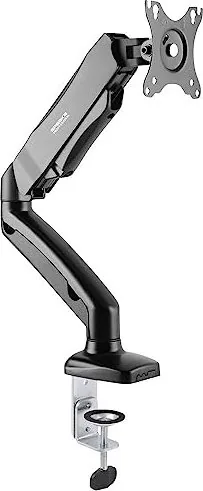
The product is a spring loaded three monitor arm with integrated hub. It secures to your table using a
clamp.
The product is intended for indoor use only. Do not use it outdoors.
Contact with moisture must be avoided under all circumstances.
If you use the product for purposes other than those described, the product may be damaged.
Improper use can result in hazards.
The product complies with the statutory national and European requirements.
For safety and approval purposes, you must not rebuild and/or modify the product.
Read the operating instructions carefully and store them in a safe place. Make this product available to
third parties only together with the operating instructions.
All company names and product names are trademarks of their respective owners. All rights reserved.
2 Delivery contents
■
Product
■
Operating instructions
3 Latest product information
Download the latest product information at www.conrad.com/downloads or scan the QR code shown. Fol-
low the instructions on the website.
4 Description of symbols
The symbol warns of hazards that can lead to personal injury.
5 Safety instructions
Read the operating instructions carefully and especially observe the safety informa-
tion. If you do not follow the safety instructions and information on proper handling,
we assume no liability for any resulting personal injury or damage to property. Such
cases will invalidate the warranty/guarantee.
5.1 General
■
The product is not a toy. Keep it out of the reach of children and pets.
■
Do not leave packaging material lying around carelessly. This may become dangerous playing mater-
ial for children.
■
If you have questions which remain unanswered by this information product, contact our technical
support service or other technical personnel.
■
Maintenance, modifications and repairs must only be completed by a technician or an authorised re-
pair centre.
5.2 Handling
■
Handle the product carefully. Jolts, impacts or a fall even from a low height can damage the product.
5.3 Operating environment
■
Do not place the product under any mechanical stress.
■
Protect the appliance from extreme temperatures, strong jolts, flammable gases, steam and solvents.
■
Protect the product from high humidity and moisture.
■
Protect the product from direct sunlight.
5.4 Operation
■
Consult an expert when in doubt about the operation, safety or connection of the product.
■
If it is no longer possible to operate the product safely, take it out of operation and protect it from any
accidental use. DO NOT attempt to repair the product yourself. Safe operation can no longer be guar-
anteed if the product:
– is visibly damaged,
– is no longer working properly,
– has been stored for extended periods in poor ambient conditions or
– has been subjected to any serious transport-related stresses.
5.5 Connected devices
■
Also observe the safety and operating instructions of any other devices which are connected to the
product.
5.6 Installation location
■
Select an installation location for the monitor holder and any supplied accessories that facilitates safe
and ergonomic use.
5.7 Before assembly and installation
■
Verify that the delivery content is complete before assembling the monitor holder and accessories. Do
not assemble if any parts are missing.
■
Prevent damage to the monitor. Refer to the manufacturer instructions that came with the monitor to
find out how and where to attach a monitor holder or monitor mount.
■
Handle the monitor and screen with care. Always lay the monitor flat and use a pad or cloth to protect
the table surface and monitor from damage.
■
Risk of injury and/or damage when unpacking the spring loaded arm! Hold each spring arm together
while someone else cuts the zip tie. Slowly release the pressure on the spring arms and open slowly
to full length.
5.8 Table mounting
If you mount the monitor holder on a table:
■
Attach the monitor holder only to a sufficiently stable, horizontal table top. Tables made of glass,
ceramic or stone slabs or thin plastic-coated wooden-fibre slabs, are categorically unsuitable for at-
tachments. Furthermore, you must not attach the monitor holder to shelves or similar unstable or un-
steady surfaces.
■
Attach the monitor holder only at a position on the table top that is suitable for this purpose. Consider
the significant lever action involved!
■
The weight of the monitor and monitor holder as well as its fixed position and significant lever action
can all cause pressure marks on the table top. For this reason, we do not recommend that you mount
it on valuable furniture items!
■
For safety reasons, the monitor holder and the monitor that is attached to it should be situated only
above the table surface. The design of many monitor holders means that it is not suitable for the mon-
itor arm to be situated anywhere other than above the table surface. There is also a danger of it top-
pling over in certain circumstances!
■
Ensure that the monitor holder is fixed to the table top securely. Otherwise it could slip off the table
top when you are moving the monitor and the monitor holder. As well as causing material damage,
this poses a danger of personal injury!
5.9 Removing a monitor
■
Risk of injury and/or damage from spring loaded arm! Before removing an attached monitor, always
set the front arm to the highest position so it cannot "spring up" after the monitor is removed.
6 Maintenance
■
Adjusting the positions of the monitor and the monitor mount can cause the screws to become loose
over time. Check all the screw fittings from time to time.
7 Cleaning and care
Important:
– Do not use aggressive cleaning agents, rubbing alcohol or other chemical solutions. They damage
the housing and can cause the product to malfunction.
– Do not immerse the product in water.
1. Disconnect the product from the power supply.
2. Clean the product with a dry, fibre-free cloth.
8 Technical data
8.1 Base
Item No.:
2731200 2731201 2731202
Model No.: SP-MM-900 SP-MM-910 SP-MM-920
Grommet* 10 – 85 mm 10 – 83 mm 10 – 85 mm
C-Clamp* 10 – 85 mm 10 – 83 mm 10 – 80 mm
*These values indicate the min./max. table thickness the grommet and c-clamp can fit.
8.2 Monitor arm
Item No.:
2731200 2731201 2731202 2731203
Model No.: SP-MM-900 SP-MM-910 SP-MM-920 SP-MM-930
Number of monit-
ors
1 2 1 2
Capacity per
monitor
2 - 9 kg 1 - 9 kg
VESA
compatible
75 x 75, 100 x 100
Monitor size 43.2 – 81.3 cm (17 - 32") 33.02 – 81.3 cm (13 - 32")
8.3 General
Item No.:
2731200 2731201 2731202 2731203
Model No.: SP-MM-900 SP-MM-910 SP-MM-920 SP-MM-930
Dimensions 117 x 468 x 570
mm
942 x 112 x 570
mm
115 x 590 x 665
mm
1100x 125 x 670
mm
Weight* 2.05 kg 3.57 kg 3.1 kg 6.03 kg
This is a publication by Conrad Electronic SE, Klaus-Conrad-Str. 1, D-92240 Hirschau (www.conrad.com).
All rights including translation reserved. Reproduction by any method (e.g. photocopying, microfilming or the capture in
electronic data processing systems) requires prior written approval from the editor. Reprinting, also in part, is prohibited.
This publication reflects the technical status at the time of printing.
Copyright by Conrad Electronic SE.
*2731200, 2731201, 2731202, 2731203_V2_0323_dh_ss_en 18014399307966475-2 I3/O2 en

Chat met je SpeaKa Professional SP-MM-900-handleiding via AI

Krijg direct AI-antwoorden uit je SpeaKa Professional SP-MM-900-handleiding

Vraag alles over SpeaKa Professional SP-MM-900. Antwoorden komen uit deze handleiding, met de pagina's waarop ze zijn gebaseerd.

SP-MM-900 Onderhoudsschema

Periodiek
Controleer alle schroefverbindingen

Het aanpassen van de monitorposities kan ertoe leiden dat schroeven na verloop van tijd losraken. Controleer af en toe alle schroefverbindingen.

Naar behoefte
Reinig het product

Koppel de stroomvoorziening los en reinig met een droge, vezelvrije doek. Gebruik geen agressieve reinigingsmiddelen en dompel het product niet onder in water.

M: qwen/qwen3.8-flash

Stel eenVraag

0/1000

Beveel je SP-MM-900 aan?

Ja Nee

Veelgestelde Vragen

A

Nee, dit product is uitsluitend bedoeld voor binnengebruik. Blootstelling aan vocht en weer kan het mechanisme beschadigen.

Is dit antwoord nuttig?

A

Gebruik stabiele, horizontale tafelbladen. Vermijd glas, keramiek, steen of dun plastic-gelakt hout.

Is dit antwoord nuttig?

A

Gebruik een droge, vezelvrije doek. Gebruik geen agressieve schoonmaakmiddelen of waterdompeling.

Is dit antwoord nuttig?

A

Ja, de SpeaKa Professional SP-MM-900 Handleiding maakt deel uit van de leveringsinhoud.

Is dit antwoord nuttig?

A

Nee, probeer niet het product zelf te repareren. Raadpleeg een technicus voor onderhoud.

Is dit antwoord nuttig?

A

VESA 75x75 en 100x100 compatibele monitoren tussen 17 en 32 inch passen.

Is dit antwoord nuttig?

A

Ja, de veerbelasting hangt af van het gewicht van de monitor. Controleer de handleiding voor limieten.

Is dit antwoord nuttig?

M: QW-35-FL

Voordelen en Nadelen

Voordelen

  • Geïntegreerde hub zorgt voor naadloze kabelbeheer en stabiliteit
  • Veerbelast ontwerp maakt moeiteloos monitors herpositioneren mogelijk
  • Stevige klem past verschillende diktes van tafels veilig vast
  • VESA compatibiliteit werkt met standaard monitor montagepatronen
  • Compact design bespaart waardevol bureauoppervlak
VS

Nadelen

  • Alleen voor binnengebruik voorkomt buiten duurzaamheid
  • Zware monitoren kunnen spanningbalans beïnvloeden
  • Vereist een stabiele tafel om kantelgevaren te voorkomen
  • Veerbelasting verstelling moet zorgvuldig worden uitgevoerd
  • Niet geschikt voor glas- of keramische tafels
M: QW-35-FL

Product Specificatie

Type

Bureau

Aantal monitoren

1

Schermafmeting

43,18-81,28 cm

Verstelbaarheid

Kantel (-45°, +90°), Draai (180°), Zwenk (180°), Hoogte verstelbaar

Max. draagvermogen

9,00 kg

VESA

75x75, 100x100

Functies

Gasveer, Kabelmanagement

Kleur

Zwart

Afmetingen (BxHxD)

46,81x57,00x11,71 cm

Gewicht

2,05 kg

M: QW-35-FL

Product Beschrijving

Verhoog uw werkplek met de SpeaKa Professional SP-MM-900

Transformeer uw kantooropstelling met de SpeaKa Professional SP-MM-900 Monitorarm. Dit veerbelaste arm is ontworpen voor naadloze integratie in uw dagelijkse workflow. Het heeft een geïntegreerde hub en bevestigt op uw tafel met een stevige klem. Of u nu complexe gegevenssets beheert of visuele inhoud maakt, het hebben van uw scherm op de perfecte hoogte vermindert nekbelasting aanzienlijk. Dit product is bedoeld voor gebruik binnenshuis en is gebouwd om dagelijks operationele eisen binnen een kantooromgeving te weerstaan. Het biedt flexibiliteit zonder afbreuk te doen aan stabiliteit.

Waarom kiezen voor deze monitorarm?

Ergonomie is essentieel voor langetermijnproductiviteit en gezondheid. De SpeaKa Professional SP-MM-900 zorgt voor een soepele verticale verstelling terwijl uw bureau netjes blijft. De VESA-compatibiliteit zorgt ervoor dat u de meeste standaardmonitors veilig kunt bevestigen. Gedetailleerde installatiestappen vindt u in de SpeaKa Professional SP-MM-900 Handleiding. Het lezen van deze gids zorgt ervoor dat u de levensduur van uw apparatuur maximaliseert en mogelijke verwondingen tijdens setup vermijdt. Correcte behandeling voorkomt onbedoelde vallen of structurele schade aan het tafeloppervlak. De klemmechanisme past zich effectief aan aan verschillende diktes.

Veiligheids- en Onderhoudsgidsen

Veerbelastte mechanismen op meubels vereisen veiligheid. Zorg ervoor dat de armen bij het uitpakken bij elkaar worden gehouden om te voorkomen dat de veer onverwachts vrijkomt en letsel veroorzaakt. Bevestig het apparaat altijd op een stabiel, horizontaal tafelblad. Vermijd glas of keramische oppervlakken die onder druk kunnen glijden of breken. Het product moet weg van vocht en direct zonlicht worden gehouden om duurzaamheid te behouden. Regelmatig onderhoud betekent schroefverbindingen controleren om stabiliteit in de loop van de tijd te waarborgen. Schoonmaken vereist een droge, vezelvrije doek om de afwerking te beschermen. Gebruik nooit chemische oplossingen of dompel het apparaat in water. Koppel stroom los als aangesloten apparaten dat vereisen. Bescherm het tegen extreme temperaturen.

Eindgedachten over de installatie

Het organiseren van uw visuele ruimte verbetert focus en professioneel comfort. Deze arm ondersteunt monitoren binnen specifieke gewichtslimieten, wat zorgt voor veilige werking gedurende jaren. Raadpleeg de bijgevoegde instructies voor specifieke gewichtscapaciteiten en VESA patronen. Door de juiste installatieprotocollen te volgen, behoudt u de geldigheid van de garantie en de veiligheid van de gebruiker. Uw werkplek verdient een professionele upgrade die stijl combineert met praktische functie voor moderne kantoren. Investeer in een oplossing die meegroeit met uw behoeften en zorgt voor comfort gedurende lange werkdagen. Zorg voor veiligheid en geniet van de vrijheid van verstelbare kijkhoeken om uw dagelijkse werkroutine effectief te verbeteren.

Belangrijke Notities

Houd verpakkingsmaterialen weg van kinderen en huisdieren omdat ze gevaarlijk kunnen zijn. Controleer de leveringsinhoud vóór het begin van de montage om ervoor te zorgen dat alle onderdelen aanwezig zijn. Neem contact op met technische ondersteuning voor niet-opgeloste vragen over installatie of gebruik. De garantie kan ongeldig zijn als er ongeautoriseerde wijzigingen worden geprobeerd.

M: QW-35-FL

© Copyright 2026 Manual.ly