Manual.ly Logo

SpeaKa Professional 10125216 Handleiding

5,0 · 1 Beoordelingen

PDF handleiding · 8 Pagina's

Nederlands

M: QW-35-FL
pagina

/ 8

Loading...
58f90aa509bf39274d8946856ea4d7317930 page 3
3
Important Information
Smart Motorized TV Ceiling Mount
Item no: 2531304 / SP-TVCM-510
Item no: 2531305 / SP-TVCM-520
1 Intended use
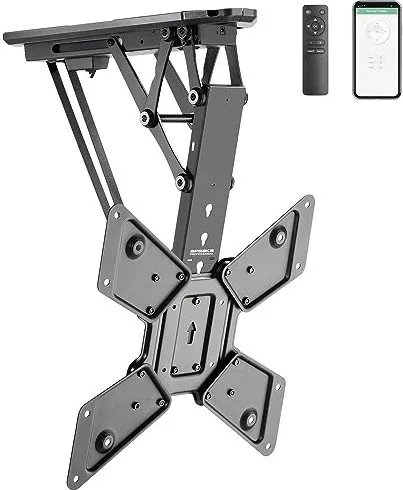
The product is a motorized TV/monitor ceiling mount. The product must be mounted to a ceiling before
use. The product is designed to hold one TV/monitor. The built-in motor moves the mount and TV/monitor
into a suitable position. The user can control the built-in motor in the following ways:
■
Remote control
■
Tuya mobile app
The product is intended for indoor use only. Do not use it outdoors.
Contact with moisture must be avoided under all circumstances.
If you use the product for purposes other than those described, the product may be damaged.
Improper use can result in short circuits, fires, electric shocks or other hazards.
The product complies with the statutory national and European requirements.
For safety and approval purposes, you must not rebuild and/or modify the product.
Read the safety instructions and any accompanying instructions carefully and store them in a safe place.
Make this product available to third parties only together with the safety instructions and any accompany-
ing instructions.
All company names and product names are trademarks of their respective owners. All rights reserved.
2 Latest product information
Download the latest product information at www.conrad.com/downloads or scan the QR code shown. Fol-
low the instructions on the website.
3 Description of symbols
The following symbols are on the product/appliance or are used in the text:
The symbol warns of hazards that can lead to personal injury.
The symbol warns of dangerous voltage that can lead to personal injury by electric shock.
4 Safety instructions
Read this document and the accompanying operating instructions carefully and espe-
cially observe the safety information. If you do not follow the safety instructions and
information on proper handling, we assume no liability for any resulting personal in-
jury or damage to property. Such cases will invalidate the warranty/guarantee.
4.1 General
■
The product is not a toy. Keep it out of the reach of children and pets.
■
Do not leave packaging material lying around carelessly. This may become dangerous playing mater-
ial for children.
■
If you have questions which remain unanswered by this information product, contact our technical
support service or other technical personnel.
■
Maintenance, modifications and repairs must only be completed by a technician or an authorised re-
pair centre.
4.2 Do not misuse
■
Do not sit, stand, hang onto, or support yourself on the product. The product can collapse or fall down
and cause injury.
■
Do not hang objects onto the product. The product can collapse or fall down and cause injury.
4.3 Handling
■
Handle the product carefully. Jolts, impacts or a fall even from a low height can damage the product.
4.4 Operating environment
■
Do not place the product under any mechanical stress.
■
Protect the appliance from extreme temperatures, strong jolts, flammable gases, steam and solvents.
■
Protect the product from high humidity and moisture.
■
Protect the product from direct sunlight.
■
Do not switch the product on after it has been taken from a cold to a warm environment. The con-
densation that forms might destroy the product. Allow the product to reach room temperature before
you use it.
4.5 Mounting surface
■
Unsuitable mounting surfaces can cause the mount to fall down and cause serious personal injury.
The mounting surface must be able to support the combined weight of the mount and the installed
monitor. If you are in doubt, ask a specialist before mounting.
4.6 Mounting materials
■
Unsuitable mounting materials can cause the mount to fall down and cause serious personal injury.
Select mounting materials (example: screws and dowels) that are suitable for the base wall material
(example: concrete).
4.7 Drilling
When penetrating the surface (example: drilling or inserting fasteners), make sure no cables
or pipes are damaged. Inadvertently penetrating electric cables causes the life-threatening
danger of an electric shock! Check for concealed wires and pipes before drilling or inserting
fasteners.
4.8 Monitor installation
■
Verify that the delivery content is complete before assembling the product. Do not assemble the
product if the delivery content is not complete.
■
Before beginning the installation process, check whether there are appropriate mounting options for a
mount on the back of your monitor.
■
A falling monitor or mount can cause serious personal damage. Keep people away from underneath
the installation location while installing the monitor.
■
Depending on the size and design of the monitor and mount concerned, it is sensible for a second
person to help with the installation. This person can hold the monitor still, for example, while you are
attaching the monitor to the mount.
■
Observe the maximum permissible monitor weight in the product documentation. Overloading can
cause the mount to collapse and lead to injury or property damage.
■
Proceed with care when assembling and installing the product! The product has some sharp edges.
There is a risk of injury!
■
Carry out only the work on the mount that is necessary to install it (or to change its location). Never
dismantle the mount and never attempt to convert it or to repair it in any way. Some mounts contain
highly pre-stressed metal springs. Dismantling such a mount in the wrong way could cause you
severe injury!
■
When fixing the monitor to the mount, make certain you use the correct screws. Not only must these
be of the correct thread type for the monitor, but they must also not be too long; otherwise, they will
damage the monitor. The screws must not be too short, however, since otherwise the connection will
not be secure.
■
The screws must be screwed into the threaded fixture holes on the monitor with at least 5 full 360°
turns. The correct screws are usually supplied together with the mount or with the monitor. Occasion-
ally, however (depending on the monitor type), other screws are required; these can be purchased
from specialist retailers.
■
Do not use any force when tightening the screws; otherwise, the monitor may be destroyed, leading
to loss of warranty/guarantee!
■
If you have any doubt about the correct length of the screws required, we recommend that you con-
tact the monitor manufacturer or an appropriate specialist.
■
Apply your full concentration when carrying out the installation, because if the monitor and/or mount
were to fall, this could cause expensive damage to the equipment and there is the potential danger of
personal injury!
■
Lay all the monitor’s cables in such a way that they do not get jammed or kinked in the mount.
■
Check all the screw fittings from time to time. Adjusting the position of the monitor and/or the mount
and moving them can sometimes cause the screws to become loose over time.
4.9 Power adapter
Do not modify or repair mains supply components including mains plugs, mains cables, and
power supplies. Do not use damaged components. Risk of death by electric shock!
■
Connect the appliance to a wall socket that can be accessed easily.
■
As power supply, only use the supplied mains adaptor.
■
Only connect the power adaptor to a normal mains socket connected to the public supply. Before
plugging in the power adaptor, check whether the voltage stated on the power adaptor complies with
the voltage of your electricity supplier.
■
Never connect or disconnect power adaptors if your hands are wet.
■
Never unplug the power adaptor from the mains socket by pulling on the cable; always use the grips
on the plug.
■
For safety reasons, disconnect the power adaptor from the mains socket during storms.
■
Do not touch the power adapter if there are any signs of damage, as this may cause a fatal electric
shock! Take the following steps:
– Switch off the mains voltage to the socket containing the power adapter (switch off the correspond-
ing circuit breaker or remove the safety fuse, and then switch off the corresponding RCD protective
switch).
– Unplug the power adapter from the mains socket.
– Use a new power adapter of the same design. Do not use the damaged adapter again.
■
Ensure that cables are not pinched, kinked or damaged by sharp edges.
■
Always lay cables so that nobody can trip over or become entangled in them. This poses a risk of in-
jury.
4.10 Batteries
■
Correct polarity must be observed while inserting batteries.
■
The batteries should be removed from the device if it is not used for a long period of time to avoid
damage through leaking. Leaking or damaged batteries might cause acid burns when in contact with
skin, therefore use suitable protective gloves to handle corrupted batteries.
■
Batteries must be kept out of reach of children. Do not leave batteries lying around, as there is risk,
that children or pets swallow them.
■
All batteries should be replaced at the same time. Mixing old and new batteries in the device can lead
to battery leakage and device damage.
■
Batteries must not be dismantled, short-circuited or thrown into fire. Never recharge non-rechargeable
batteries. There is a risk of explosion!
4.11 Operation
■
Consult an expert when in doubt about the operation, safety or connection of the product.
■
If it is no longer possible to operate the product safely, take it out of operation and protect it from any
accidental use. DO NOT attempt to repair the product yourself. Safe operation can no longer be guar-
anteed if the product:
– is visibly damaged,

Chat met je SpeaKa Professional 10125216-handleiding via AI

Krijg direct AI-antwoorden uit je SpeaKa Professional 10125216-handleiding

Vraag alles over SpeaKa Professional 10125216. Antwoorden komen uit deze handleiding, met de pagina's waarop ze zijn gebaseerd.

10125216 Onderhoudsschema

Periodiek
Controleer alle schroefverbindingen

Controleer of de schroeven niet los zijn geraakt door aanpassingen van de monitor of beweging van de bevestiging. Haal ze indien nodig aan.

Naar behoefte
Reinig de behuizing van het product

Koppel de stroomvoorziening af en veeg af met een droge, vezelvrije doek. Gebruik geen agressieve schoonmaakmiddelen en dompel het product niet onder in water.

M: qwen/qwen3.8-flash

Stel eenVraag

0/1000

Beveel je 10125216 aan?

Ja Nee
0
User Pic

NisiQui94

5 maanden geleden

Is het wandmontagesysteem stabiel, en kun je met de bijbehorende app eenvoudig de hoogte van de TV aanpassen?

0
User Pic

Manual.ly

5 maanden geleden

Ja, gebruikers bevestigen dat de houder zeer bevredigend is. De app regelt de tv-beweging omhoog en omlaag foutloos via de smartphone. Bovendien helpen de meegeleverde handleiding en het boorsjabloon aanzienlijk bij het ophangen van het product. De installatie is eenvoudig en de prestaties werken perfect volgens de feedback.

M: QW-35-FL
M: QW-35-FL

Veelgestelde Vragen

A

Nee, dit product is ontworpen voor gebruik binnenshuis. Contact met vocht moet onder alle omstandigheden worden vermeden om schade te voorkomen en veiligheid te garanderen. Buiten gebruik is in strijd met de garantiebepalingen.

Is dit antwoord nuttig?

A

Afhankelijk van de specifieke modelvariant kan het tot dertig of vijfendertig kilogram dragen. Controleer altijd of het plafondoppervlak het gecombineerde gewicht van het montagesysteem en uw apparaat kan dragen.

Is dit antwoord nuttig?

A

U kunt de ingebouwde motor bedienen via de meegeleverde afstandsbediening of door verbinding te maken met de Tuya Mobile App. Dit biedt flexibele positioneringsopties voor uw entertainmentopstelling.

Is dit antwoord nuttig?

A

De afstandsbediening vereist twee type AAA batterijen waarmee elk 1.5 volt wordt verstrekt. Zorg ervoor dat u beide batterijen tevens vervangt wanneer nodig om juiste functies te behouden.

Is dit antwoord nuttig?

A

Gebruik een droge, vezelvrije doek om de behuizing schoon te maken. Koppel het product eerst los van de voeding. Doop het niet in water of gebruik agressieve reinigingschemicaliën.

Is dit antwoord nuttig?

M: QW-35-FL

Voordelen en Nadelen

Voordelen

  • Gemotoriseerde aanpassing via afstandsbediening of mobiele app
  • Ondersteunt grote schermen tot zeventig inch
  • Voldoet aan Europese veiligheids- en nalevingsnormen
  • Draadloze connectiviteit met twintig meter bereik
  • Binneninstallatie bespaart vloerruimte
VS

Nadelen

  • Alleen strikt voor gebruik binnenshuis
  • Kan niet buiten in vocht worden gebruikt
  • Montage vereist nauwkeurige schroeflengteverificatie
  • Voorbelast veren brengen installatierisico's met zich mee
  • Verplichte batterijvervanging elke keer
M: QW-35-FL

Product Specificatie

Type

Plafondmontage

Aantal Monitoren

1

Schermgrootte

58,42-139,70 cm

Mobiliteit

kantelbaar (0°, +75°), draaibaar (6°), in hoogte verstelbaar, gemotoriseerd

Maximale Belasting

30,00 kg

VESA

100x100, 200x200, 300x300, 400x200, 400x400

Kleur

Zwart

Gewicht

7,44 kg

M: QW-35-FL

Product Beschrijving

Pas uw woonruimte aan met de SpeaKa Professional 10125216

Upgrade uw thuisentertainmentopstelling met de SpeaKa Professional 10125216. Dit innovatieve gemotoriseerde tv-plafondmontageframe biedt een strak design en geavanceerde functionaliteit. Raadplegen van de SpeaKa Professional 10125216 Handleiding zorgt voor een juiste installatie voor veiligheid en levensduur. De ingebouwde motor past de positie moeiteloos aan via een handige afstandsbediening of de Tuya Mobile App. Het is specifiek ontworpen voor gebruik binnenshuis. Contact met vocht moet onder alle omstandigheden worden vermeden om schade te voorkomen.

Deze apparatuur houdt één televisie of monitor veilig boven ooghoogte vast. Installatie vereist een plafondoppervlak dat het gecombineerde gewicht van het montagesysteem en het apparaat kan dragen. Specifieke modelvariaties ondersteunen gewichtslimieten tot vijfendertig kilogram met compatibele schermmaten variërend van drieëntwintig tot zeventig inch. Controleer schroeflengten zorgvuldig om interne schade te voorkomen. Scherpe randen bestaan tijdens de montage dus behandel met uiterste zorg om verwondingen te voorkomen.

Onderhoud omvat regelmatig schoonmaken met een droge, vezelvrije doek. Gebruik geen water of agressieve chemicaliën op de behuizing. Zorg ervoor dat de voeding is losgekoppeld voordat het schoonmaakproces begint. De voedingadapter vereist standaard huishoudelijke spanning die compatibel is met openbare voorraadnormen. Batterijen in de afstandsbediening zijn type AAA en moeten tevens worden vervangen. Wi-Fi-dekking reikt tot twintig meter betrouwbaar. Bluetooth ondersteunt ook een range van twintig meter voor connectiviteit.

Veiligheid is van belang tijdens de volledige levenscyclus van eigendom. Mis het montagesysteem niet door erop te zitten of objecten eraan op te hangen. Beproeving het montagesysteem zelf te demonteren niet omdat het voorbelast veren bevat. Houd kinderen weg van verpakkingsmateriaal om verstikkingsgevaren te voorkomen. Als zichtbaar beschadigd, repareer niet zelf. Raadpleeg een technicus om de garantie geldig te houden en veiligheid te handhaven. Omgevingsomstandigheden moeten tussen nul en veertig graden Celsius blijven met relatieve vochtigheid tussen twintig en achtenvijftig procent.

Voorzichtig verwijdering is vereist aan het einde van de productlevenscyclus. Scheid batterijen van het apparaat voorafgaand aan het weggooien. Volg lokale regelgeving voor elektronisch afval strikt. Dit apparaat voldoet aan Europese veiligheidsvereisten. Geniet van een flexibel kijkhoek zonder permanente structurele beperkingen na correcte installatie. De SpeaKa Professional 10125216 brengt slimme gemakken naar uw ruimte indeling en maximaliseert vloerruimte efficiëntie. Controleer alle bevestigingen periodiek omdat beweging deze over tijd kan losser maken.

Gebruiksnotities

Zorg ervoor dat de voeding is losgekoppeld voor reiniging. Controleer alle schroefbevestigingen periodiek omdat beweging deze over tijd kan losser maken. Regelmatige inspectie zorgt ervoor dat uw investering lang duurt.

M: QW-35-FL

© Copyright 2026 Manual.ly