
PerfectPro Netbox Handleiding
PDF handleiding · 70 Pagina's
Nederlands



Snelle check
Onjuist antwoord, probeer opnieuw.
Chat met je PerfectPro Netbox-handleiding via AI
Krijg direct AI-antwoorden uit je PerfectPro Netbox-handleiding
Vraag alles over PerfectPro Netbox. Antwoorden komen uit deze handleiding, met de pagina's waarop ze zijn gebaseerd.
Netbox Onderhoudsschema
Vervang of laad de batterijen op wanneer er sprake is van verminderde kracht, vervorming, haperend geluid of een rode batterijindicator.
Als de radio aan regen wordt blootgesteld, droogt u de stekker en het snoer volledig voordat u deze weer op het stopcontact aansluit om elektrische schokken te voorkomen.
Stel eenVraag
Beveel je Netbox aan?
Ja NeeVeelgestelde Vragen
Selecteer Bluetooth-modus op de radio, druk lang op de afstemknop tot de indicator blauw knippert. Selecteer vervolgens de radio op uw apparaat. Het wachtwoord is 0000 indien gevraagd.
Is dit antwoord nuttig?
Dit betekent dat de radio beschermd is tegen watersproeiing en stofindringing. Het is geschikt voor buitengebruik tijdens regen op batterijvoeding.
Is dit antwoord nuttig?
Ja, de USB-poort biedt 5V / 1A output om USB-apparaten op te laden of audiobestanden te spelen die op de poort zijn aangesloten.
Is dit antwoord nuttig?
De radio kan tot 40 geheugen presets opslaan voor DAB, FM, en Internet radio zenders voor snelle toegang.
Is dit antwoord nuttig?
Ja, u kunt verbinding maken via Bluetooth of Spotify Connect technologie via compatibele apparaten gebruiken om muziek te streamen.
Is dit antwoord nuttig?
Ga naar het Systeeminstellingen menu, selecteer Tijd/Datum, en kies Tijd/Datum instellen. Gebruik de afstemknop om elk element aan te passen.
Is dit antwoord nuttig?
De radio wordt geleverd met 2 jaar beperkte garantie die defecten dekt maar geen schade als gevolg van misbruik of ongeautoriseerde aanpassingen.
Is dit antwoord nuttig?
Voordelen en Nadelen
Voordelen

- IP64-bescherming tegen water en stof
- Uitgebreid gamma aan audioweergavemodi inclusief DAB en Internet
- Bluetooth 5.2 stereo-pairingsfunctie
- USB-oploadmogelijkheid voor externe apparaten
- Compatibel met UNDOK-app voor afstandsbediening
Nadelen

- Vereist 6 afzonderlijke C-batterijen voor mobiel gebruik
- Geen ingebouwde oplaadbare batterij inbegrepen
- Handmatige installatie vereist voor netwerkverbinding
Product Specificatie
Stroombron
6x C-batterij, Netvoeding (110-230V)
Outputvermogen
3-7W
Tuner
FM, DAB, DAB+, Internetradio
Aansluitingen
AUX-in (3,5 mm), USB, Bluetooth, Wi-Fi 802.11b/g/n
Functies
Handvat, klok, alarmfunctie, 5 geheugenplaatsen, USB-laadpoort
Veiligheid
Spatwaterdicht, Stootvast, Stofdicht, IP65
Afmetingen (BxHxD)
35,51x22,50x21,49 cm
Gewicht
4,50 kg
Inhoud verpakking
Stroomadapter
Product Beschrijving
De Ultieme Bouwplaatspartner
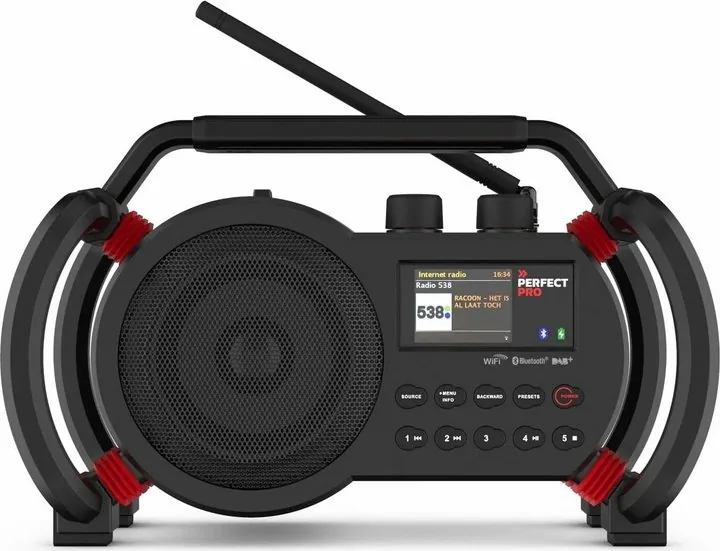
De PerfectPro Netbox Bouwplaats Radio onderscheidt zich als een onmisbaar gereedschap voor professionals onderweg. Ontworpen om de zware omstandigheden van een bouwomgeving te weerstaan, zorgt deze radio voor duidelijke audio ongeacht de omringende geluiden. Door integratie van multiple connectiviteitsopties, biedt het veelzijdigheid die traditionele radio's missen. De robuuste bouwkwaliteit maakt het een favoriet onder aannemers die betrouwbare apparatuur nodig hebben in uitdagende omstandigheden zonder uitsluitend op netstroom te vertrouwen. Dit apparaat is ontworpen voor duurzaamheid en prestaties in veeleisende omgevingen.
Connectiviteit en Veelzijdigheid
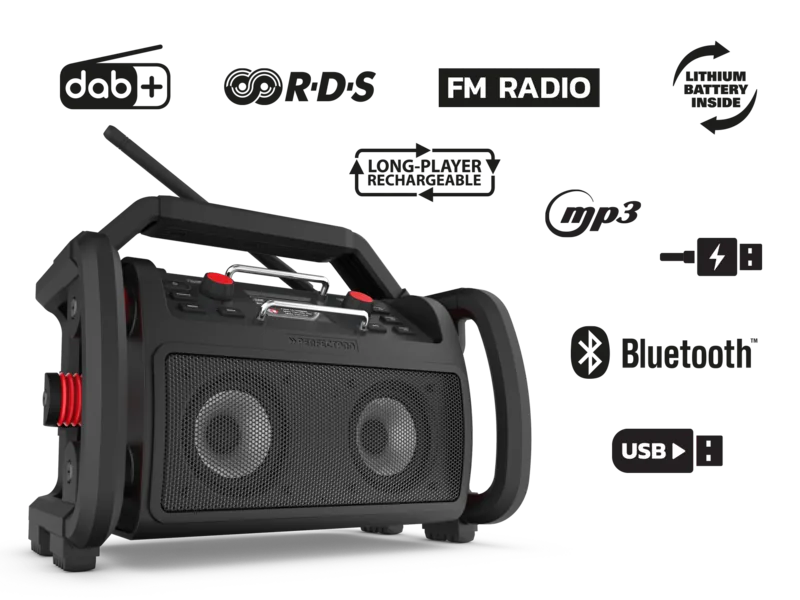
Gebruikers kunnen genieten van DAB, FM, en Internet radio modi naadloos. Met Wi-Fi-connectiviteit, toegang tot duizenden zenders wereldwijd zonder noodzaak van een zendmast in de buurt. Podcasts en Spotify integratie betekent entertainment is nooit ver weg tijdens de pauze. Bluetooth 5.2 ondersteunt stereo pairing, waardoor twee eenheden een ware stereo geluidssysteem draadloos kunnen maken. Een USB-poort biedt audio weergave en apparaat opladen, wat gemak toevoegt voor gebruikers die hun telefoons op de werf schakelend nodig hebben. Een extra input zorgt voor compatibiliteit met oudere apparaten zoals MP3-spelers of tablets. U kunt zelfs presets opslaan voor uw favoriete zenders voor snelle toegang.
Duurzaamheid en Ontwerp
Gebouwd met een IP64 rating, weerstaat de Netbox stof en watersproeiing effectief. Dit maakt het ideaal voor gebruik buiten, zelfs in natte omstandigheden wanneer batterijvoeding wordt geselecteerd. De robuuste ontwerp bevat een robuuste handgreep en sterke behuizing die interne componenten beschermt tegen accidentele vallen. Batterijdrift ondersteunt 6 C-formaat batterijen, zorgt voor lange runtime zonder afhankelijkheid van netstroom tijdens werk op locatie. Oplaadbare NiMH batterijen kunnen ook worden gebruikt met de juiste schakel-instelling voor ecologische bediening.
Gebruikersinterface en Besturing
Navigatie is eenvoudig met een duidelijk LCD-scherm en intuïtieve knop-besturingen. De UNDOK-app stelt beheer op afstand mogelijk van smartphones of tablets voor extra gemak. Instellingen zoals toonregeling en hardheid stellen audio aanpassing mogelijk om persoonlijke gehoorvoorkeuren of lawaaierige omgevingen te passen. Een wekkerfunctie helpt bij het vroeg opstaan op locatie, terwijl een slaapstandtimer energiebesparing verzekert 's nachts. Het systeeminstellingenmenu stelt netwerkconfiguratie en fabrieksinstellingen toe indien nodig.
Veiligheid en Installatie
Raadpleeg de PerfectPro Netbox Bouwplaats Radio Handleiding voor gedetailleerde installatie instructies inclusief netwerkconfiguratie. Dit apparaat combineert robuuste techniek met moderne streaming mogelijkheden. Of het nu op locatie of thuis is, het levert betrouwbare prestaties. Zorg dat u de veiligheidsrichtlijnen leest met betrekking tot batterijbehandeling en elektrische verbindingen voor bediening. Het product ondersteunt automatische tijdupdates via netwerk of radiosignalen. Houd ventilatie altijd helder om oververhitting bij langdurig gebruik te voorkomen. Garantie dekt defecten maar niet misbruik of waterschade bij gebruik van AC-voeding in regen. De 5 inch full-range speaker levert 7 watt vermogen bij AC-spanning. Het ondersteunt beide 50/60 Hz standaarden wereldwijd. Dit zorgt voor internationale compatibiliteit voor reizen. Bescherm de voedingskabel tegen slijtage.
Zoek naar 67.732 Handleidingen online


Typ merk of model in