Manual.ly Logo

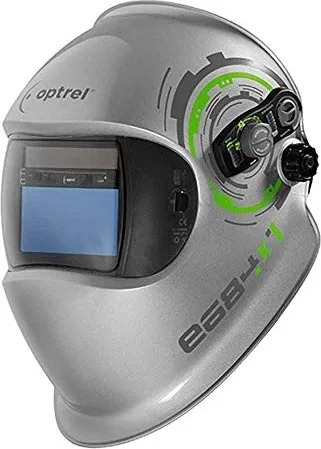
Optrel e684 Handleiding

0,0 · 0 Beoordelingen

PDF handleiding · 36 Pagina's

Nederlands

M: OA-GPT-54-NAN
pagina

/ 36

Loading...
fdeb6a850eb4dcb4cf82adeae090d7596780 page 9
9
Safety instructions
Please read the operating instructions before using the helmet. Check that the front cover lens is fitted
correctly. If it is not possible to eliminate errors, you must stop using the cartridge.
Precautions & protective restrictions
During the welding process, heat and radiation are released, which can cause damage to the eyes and
skin. This product offers protection for the eyes and face. When wearing the helmet, your eyes are always
protected against ultraviolet and infrared radiation, regardless of the shade level. To protect the rest of your
body, appropriate protective clothing must also be worn. In some circumstances, particles and substances
released by the welding process can trigger allergic skin reactions in correspondingly predisposed
persons. Materials that come into contact with skin may cause allergic reactions to susceptible persons.
The protective welding helmet must only be used for welding and grinding and not for other applications.
optrel assumes no liability when the welding helmet is used for purposes other than intended or with
disregard for the operating instructions. The helmet is suitable for all established welding procedures,
excluding gas and laser welding. Please note the recommended protection level in accordance with
EN169 on the cover.
Sleep mode
The cartridge has an automatic switch-off function, which increases the service life. If the light falls on the
catridge for a period of approx 10 minutes less than 1 Lux, it automatically switches off. To reactivate the
cartridge,it must be briefly exposed to daylight. If the shade cartridge cannot be reactivated or does not
darken when the welding arc is ignited, the batteries must be replaced.
Warranty & liability
Please see the instructions of the national sales organisation of optrel for warranty provisions. For further
information in this respect, please contact your optrel dealer. Warranty is only granted for material and
manufacturing defects. In the case of damage caused by improper use, unauthorised intervention or
through usage not intended by the manufacturer, the warranty or liability are no longer valid. Likewise,
liability and the warranty are no longer valid if spare parts other than those sold by Optrel are used.
Expected Lifetime
The welding helmet has no expiration date. The product can be used as long as no visible or invisible
damage or functional problems occur.
How to use (Quick Start Guide)
1. Head band. Adjust the upper adjusting band (p. 2) to the size of your head. Push in the ratchet knob
(p. 2) and turn until the head band fits securely but without pressure.
2. Distance from eyes and helmet angle. By releasing the locking knobs (p. 2-3), the distance between
the cartridge and the eyes can be adjusted. Adjust both sides equally and do not tilt. Then tighten the
locking knobs again. The helmet angle can be adjusted using the rotary knob (p. 4).
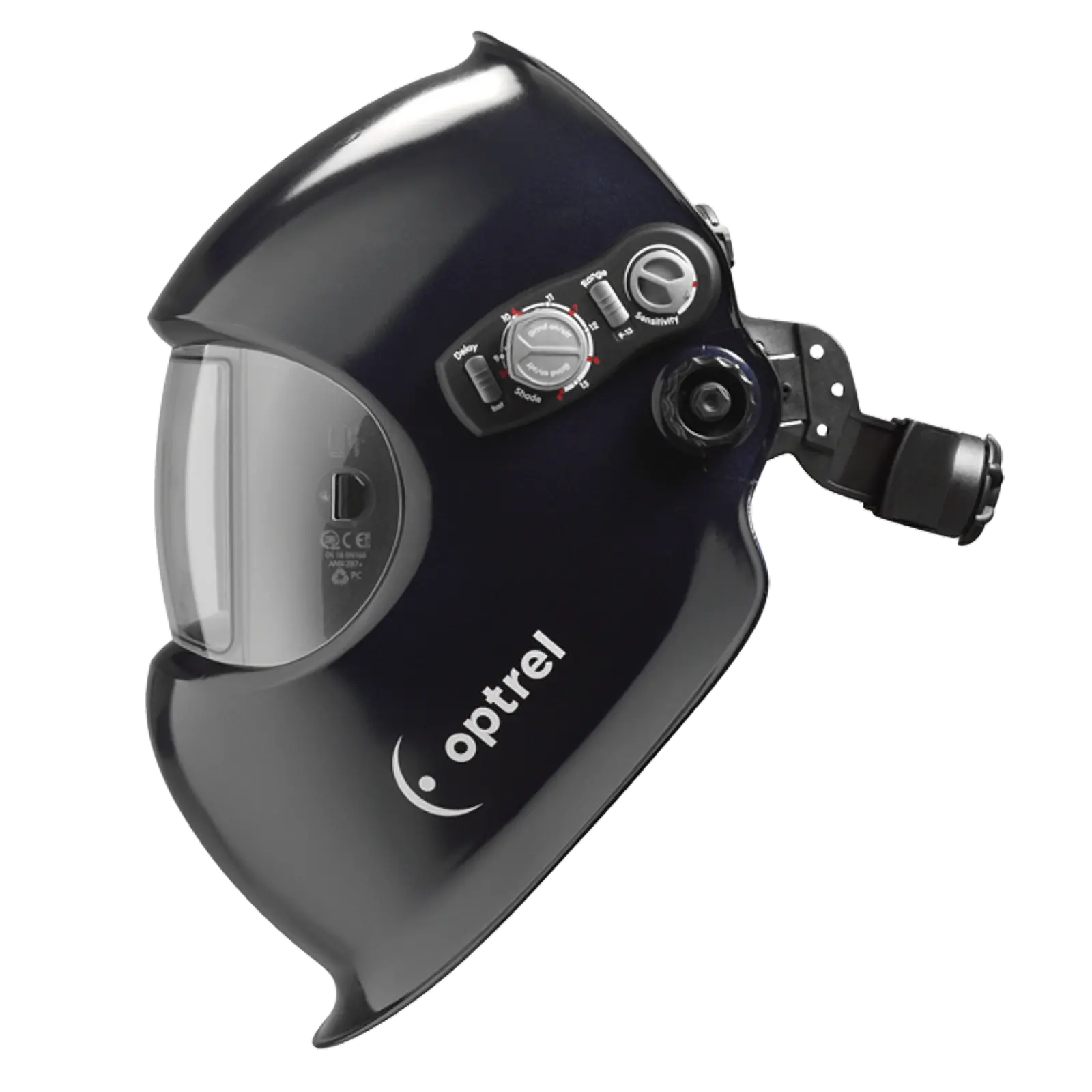
3. Automatic/manual operating mode. The sliding switch (p. 5) is used to set the protection level
setting mode. In automatic mode, the protection level is automatically adjusted to the intensity of
the light arc via sensors (standard EN 379:2003). In manual mode, the protection level can be set by
turning the knob (p. 4-5).
4. Shade Level. In "manual" mode, the protection level can be set by the range slider between the range
level SL5 to SL9 and SL9 to SL13. The fine adjustment can be set by turning the potentiometer knob
(p. 4-5). In "automatic" mode, the protection level (SL5
– SL13) corresponds to standard EN 379,
if the potentiometer knob (p. 4-5) is set to position "N". Turn the knob to correct the automatically
set protection level by two protection levels up or down, depending on personal preference.(green
inscription)
5. Grinding mode. Press the Grind button (p. 4) to switch the cartridge to grinding mode. In this mode
the cartridge is deactivated and remains in light mode. The activated grinding mode is indicated by
the red flashing LED (p. 4) inside the helmet. To deactivate grinding mode, press the protection level
knob again.After 10 minutes, the grinding mode is automatically reset.
6. Sensitivity. Use the sensitivity knob (p. 5) to set the ambient light sensitivity. The border of the "Super
High" area is the standard sensivity setting. By turning the knob, these can be customized. In the
"Super High" area the maximum light sensitivity can be achieved.
7. Sensor slider. The sensor slider can be set to two different positions. Depending on the position,
the ambient light detection angle is reduced (p. 5) or increased (p. 5).
8. Delay switch. The opening knob (Delay) (p. 5) allows to select an opening delay from dark to light.
The knob allows infinite adjustment from dark to light between 0.1 to 2.0 s which protects the eyes.
9. Twilight mode. When setting the delay knob to high delays a fading effect (twilight mode) can be
enabled which protects the eyes from the very bright after glow when welding has finished. However
using the twilight mode in high frequency tack welding applications is not recommended. Set the
delay to minimum when tack welding.
Cleaning
The shade cartridge and the front cover lens must be cleaned with a soft cloth at regular intervals. No
strong cleaning agents, solvents, alcohol or cleaning agents containing scouring agent must be used.
Scratched or damaged lenses must be replaced.
Storage
The welding helmet must be stored at room temperature and at low humidity. Storing the helmet in the
original packaging will increase the service life of the batteries.
Replacing the the front cover lens (p. 6-7)
Push in one side clip to release the front cover lens and then remove it. Attach the new front cover lens to
one side clip. Pull the front cover lens round to the second side clip and clip in place. This action requires
some pressure to ensure that the gasket on the front cover lens has the desired effect.
Replacing the batteries (p. 3)
The cartridge has replaceable Lithium button cell batteries, type CR2032. If you are using a welding helmet
with a fresh air connection, you must remove the face seal before replacing the batteries. The batteries
must be replaced when the LED on the cartridge flashes in green.
1. Carefully remove the battery cover
2. Remove the batteries and dispose of them in accordance with the national regulations for special waste
3. Insert CR2032 type batteries, as shown
4. Carefully replace the battery cover
If the shade cartridge does not darken when the welding arc is ignited, please check battery polarity.
To check whether the batteries still have sufficient power, hold the shade cartridge against a bright
lamp. If the green LED flashes, the batteries are empty and must be replaced immediately. If the shade
cartridge does not operate correctly in spite of correct battery replacement, it must be declared unusable
and must be replaced.
Removing/installing the cartridge (p. 6)
1. Pull out the protection level knob
2. Carefully remove the battery cover
3. Unlock the cartridge retention spring as shown
4. Carefully tilt the cartridge out
5. Unlock the satellite as shown
6. Pull the satellite out through the gap in the helmet
7. Rotate the satellite by 90° and push through the hole in the helmet
8. Remove / replace the shade cartridge
The cartridge is installed in the reverse order.
Troubleshooting
Cartridge does not darken
→ Adjust sensitivity (p. 5)
→ Change the sensor slider position (p.5)
→ Clean sensors or front cover lens
→ Deactivate grinding mode (p. 4)
→ Check the light flow to the sensor
→ Select manual mode (p. 4-5)
→ Replace the batteries (p. 3)
Protection level too light
→ Select manual mode (p. 4-5)
→ In automatic mode, adjust rotary knob by +1 or +2 (p. 4-5)
→ Replace front cover lens (p. 6 -7)
Protection level too dark
→ Select manual mode (p. 4-5)
→ In automatic mode, adjust rotary knob by -1 or -2 (p. 4-5)
Cartridge flickers
→ Adjust position of the delay knob (p. 4) on welding procedure
→ Replace the batteries (p. 3)
Poor vision
→ Clean the front cover lens or cartridge
→ Adjust the protection level to the welding procedure
→ Increase the ambient light
Welding helmet slips
→ Adjust/tighten the head band (p. 2)
Specifications
(We reserve the right to make technical changes)
Shade Level SL4 (light mode)
SL5 – SL13 (dark mode)
UV/IR protection Maximum protection in light and dark modes
Switching time from light to dark 170μs (23°C / 73°F)
110μs (55°C / 131°F)
Switching time from dark to light 0.1 - 2.0s with "Twilight Function"
Dimensions of cartridge 90 x 110 x 7mm / 3.55 x4.33 x 0.28“
Dimensions of field of vision 50 x 100mm / 1.97 x 3.94“
Power supply Solar cells, 2 pcs. LI batteries 3V replaceable (CR2032)
Weight 500g / 17.637 oz
Operating temperature -10°C – 70°C / 14°F – 157°F
Storage temperature -20°C – 80°C / -4°F – 176°F
Classification as per EN379 Optical class = 1
Light scatter = 1
Homogeneity = 1
Angle of vision dependency = 1
Standards CE, EAC, ANSI, AS/NZS
Spare parts (p. 6-7)
-Helmet without cartridge (5001.684) -Repair set 1 (Potentiometer knob, Sensitivity
-Cartridge incl. satellite (5012.480) knob, Battery cover) (5003.500)
-Front cover lens (5000.210) -Head band with fastener (5003.250)
-Repair set 2 (5003.501) -Sweat band (5004.073 / 5004.020)
-Inner protection lens (5000.001)
English

Chat met je Optrel e684-handleiding via AI

Krijg direct AI-antwoorden uit je Optrel e684-handleiding

Vraag alles over Optrel e684. Antwoorden komen uit deze handleiding, met de pagina's waarop ze zijn gebaseerd.

e684 Onderhoudsschema

Regelmatige intervallen
Cartridge en voorste lens reinigen

Reinig de schaduwcartridge en de voorste deksellens regelmatig met een zachte doek. Gebruik geen sterke reinigingsmiddelen, oplosmiddelen, alcohol of schuurmiddelen.

Naar behoefte
Krabbelende lenzen vervangen

Vervang gekrabbelde of beschadigde lenzen onmiddellijk om goede visie en bescherming te garanderen.

Wanneer aangegeven
Batterijen vervangen

Vervang CR2032-batterijen wanneer de groene LED op de cartridge groen knippert of als de cartridge niet donkerder wordt.

M: QW-35-FL

Stel eenVraag

0/1000

Beveel je e684 aan?

Ja Nee

Veelgestelde Vragen

A

Hij combineert automatische donkerte-aanpassing met handmatige bediening, plus gevoeligheid, vertraging en slijpmodi. Daardoor is hij flexibeler dan een eenvoudige helm met vaste tint en beter geschikt voor verschillende lasstijlen.

Is dit antwoord nuttig?

A

Ja. De slijpmodus houdt de lens in de lichte stand, zodat u zonder onverwacht donker worden kunt overschakelen naar slijpen. Dat helpt bij gecombineerd las- en afwerkwerk.

Is dit antwoord nuttig?

A

De helm ondersteunt SL5 tot SL13 in de donkere stand en SL4 in de lichte stand. In de automatische modus past hij de tint aan op basis van de booghelderheid, terwijl de handmatige modus u laat finetunen.

Is dit antwoord nuttig?

A

Hij is geschikt voor de meeste standaard lasprocessen, maar niet ontworpen voor gaslassen of laserlassen. Stem de tintinstelling altijd af op de klus en volg de veiligheidsrichtlijnen.

Is dit antwoord nuttig?

A

De cassette gebruikt zonnecellen en vervangbare CR2032-lithiumbatterijen. Als de lens niet meer donker wordt of het indicatielampje groen knippert, moeten de batterijen worden gecontroleerd en vervangen.

Is dit antwoord nuttig?

A

Stel de hoofdband, de afstand tot de ogen en de hoek van de helm zo af dat de helm stevig zit zonder druk te geven. Door de lens en sensoren schoon te houden, blijft het zicht ook beter en vermindert onnodige vermoeidheid.

Is dit antwoord nuttig?

M: OA-GPT-54-NAN

Voordelen en Nadelen

Voordelen

  • Snelle reactie van de automatisch donker wordende functie helpt oogbelasting tijdens het starten van de boog te verminderen.
  • Handmatige tintregeling geeft meer gepersonaliseerde beschermingsinstellingen.
  • Slijpmodus houdt de lens licht voor veiligere overgangen tussen taken.
  • Twilight-vertragingsfunctie verbetert het comfort wanneer de boog stopt.
  • Vervangbare CR2032-batterijen en zonne-ondersteuning verlengen het praktische gebruik.
VS

Nadelen

  • Niet bedoeld voor gaslassen of lasertoepassingen.
  • Vereist af en toe batterijvervanging en onderhoud van de lens.
  • Veel instellingen kunnen voor nieuwe gebruikers tijd kosten om te leren.
  • Prestaties zijn afhankelijk van schone sensoren en een juiste afstelling van de helm.
M: OA-GPT-54-NAN

Product Specificatie

Kleur

grijs

Gezichtsveld

100x50 mm

Stroomvoorziening

Zonne-energie, Batterij

Speciale functies

Beschermingsniveau 5-13

Gewicht

500 g

M: GO-GEM-FL-25

Product Beschrijving

Optrel e684 automatische lashelm: slimme bescherming voor veeleisende lassers

De Optrel e684 automatische lashelm is gemaakt voor lassers die betrouwbare oogbescherming willen zonder in te leveren op comfort of controle. Op het eerste gezicht valt hij op door het strakke, Zwitserse ontwerp, maar de echte waarde zit in de cassette: snelle automatisch donker wordende prestaties, flexibele instelling van de donkerte en praktische functies die zowel las- als slijpwerk ondersteunen.

Een van de grootste sterke punten van deze helm is het aanpasbare donkertebereik. In de automatische modus reageert het filter op de boogintensiteit en ondersteunt het tinten van SL5 tot SL13, terwijl SL4 beschikbaar is in de lichte stand. Daardoor is hij geschikt voor veelvoorkomende lastoepassingen, van lichtere taken tot zwaardere klussen. De handleiding van de Optrel e684 automatische lashelm benadrukt ook de handmatige afstelling, waardoor gebruikers meer controle hebben als ze de donkerte willen afstemmen op hun eigen voorkeur of op een specifiek proces.

De helm draait niet alleen om donkerte. Hij heeft gevoeligheidsinstelling, een sensorschuif en een vertragingsregeling die helpt bepalen hoe snel de lens na het lassen weer licht wordt. De Twilight Function is vooral handig wanneer fel nagloeien de ogen kan belasten, en zorgt voor een zachtere overgang die natuurlijker aanvoelt bij repetitief werk. Voor slijpen houdt een speciale slijpmodus de cassette in de lichte stand en voorkomt onnodig schakelen.

Ook comfort telt. De hoofdband kan worden aangepast voor pasvorm, hoek en afstand tot de ogen, waardoor de helm prettiger te dragen is tijdens lange sessies. Met een licht gewicht van ongeveer 500 g en een gezichtsveld van 50 x 100 mm biedt hij een uitgebalanceerde combinatie van bescherming en zicht. Zonne-ondersteuning plus vervangbare CR2032-batterijen zorgen er ook voor dat hij na verloop van tijd klaar blijft voor gebruik.

Dit model is een sterke keuze voor lassers die waarde hechten aan precisie, veelzijdigheid en betrouwbare bescherming. Hij is geschikt voor dagelijks werk in de werkplaats, professionele reparaties en klussen waarbij constante zichtbaarheid net zo belangrijk is als sterke bescherming tegen uv- en ir-straling. Als u een lashelm nodig hebt die automatisering combineert met hands-on controle, dan is de e684 een solide en doordachte optie.

Opmerkingen

  • Het meest geschikt voor lassen en slijpen, niet voor gas- of laserlassen.
  • Regelmatig schoonmaken en correcte vervanging van de lens helpen de prestaties te behouden.
  • Controleer de batterijstatus als de lens niet meer goed donker wordt.
M: OA-GPT-54-NAN

© Copyright 2026 Manual.ly