Low Battery Warning: The light will vibrate once every 30
seconds when the battery power is less than 10%, except
for the moonlight mode.
SUPPORTED BATTERY
* The light is equipped with a customized 21700
rechargeable battery. In case of emergency, other brand’s
21700 battery with built-in protection board can be used
(but charging is not supported). It may turn off due to
other brand’s low battery protection current.
* Only charge with standard USB magnetic charging cable, not
compatiable with other USB magnetic charging cable.
* Before the first use please fully charge the product.
* Connect the magnetic USB end of the charging cable to an
external USB power source, then attach the other end of
the magnetic charging cable to the charging port. It takes
no more than 3.5 hours to fully charge the light ( For
reference only. When the USB power supply is insufficient
to provide 5V 2A power capacity, the charging time will
be longer ).
PROXIMITY PROTECTION FUNCTION
When the proximity sensor detects an obstruction nearby,
the brightness will automatically reduce. The light will shut
down directly if the blockage continues for more than 60
seconds. The sensor is sensitive to occlusion only (the
sensing distance will be different due to different colors
and materials).
LANYARD ATTACHMENT
Put the pin tool through the light lanyard hole and then hook
the lanyard to the hole.
1. Remove the pocket clip.
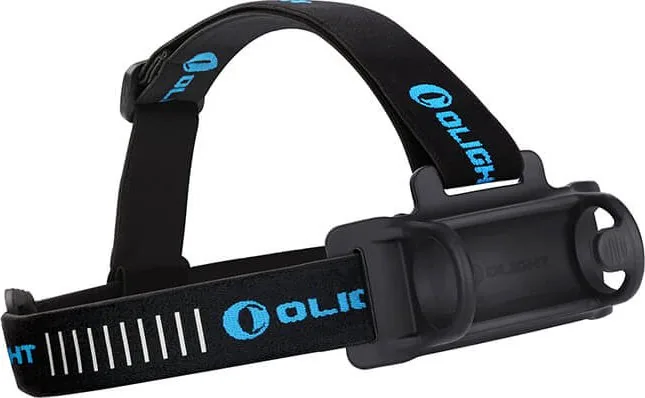
HOW TO TURN IT INTO A HEADLAMP
2. Put the flashlight into the bracket with the tail first.
3. Adjust the flashlight to the appropriate position.
•Moonlight and turbo mode are not the normal brightness
levels ( low, medium, and high mode ). Under moonlight
and turbo mode, press and hold the switch to enter the
normal brightness level cycle.
•When the light is turned on, the light will return to the last
used setting. Only moonlight, low, medium, and high mode
can be memorized when the light is turned off. If the light
is turned off on turbo mode, it will memorize high mode
and will revert to the medium setting after 10 minutes.
SOS mode cannot be memorized.
•When the battery capacity is less than 60%, the internal
MCU will automatically shield the turbo mode and reset
high mode to the highest brightness level.
•Active thermal management: On turbo mode, overheating
can be avoided by adjusting the power output.
NOTICE
DANGER
•
DO NOT throw the light directly into human eyes. This may cause
temporary blindness, or permanent damage to the eyes.
•
The battery can only be charged while installed in the flashlight.
When charging, please use the provided charger for your light.
WARNING
•Keep out of reach of children.
•If the light is about to be put aside for a long time or be
transported, please unscrew the body for half a circle to
cut off the circuit.
•DO NOT use the turbo mode continuously when the
environmentaltemperature is high in case the light body is
too hot to hold.
•Ensure the battery is inserted with the negative ( - ) end
pointing to the head of the light ( LED side ).
•Take good care of the battery; if the battery needs to be
replaced, please keep the removed battery in a safe place.
DO NOT mix it with the conductive metals.
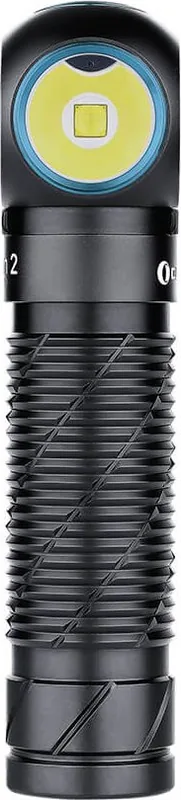
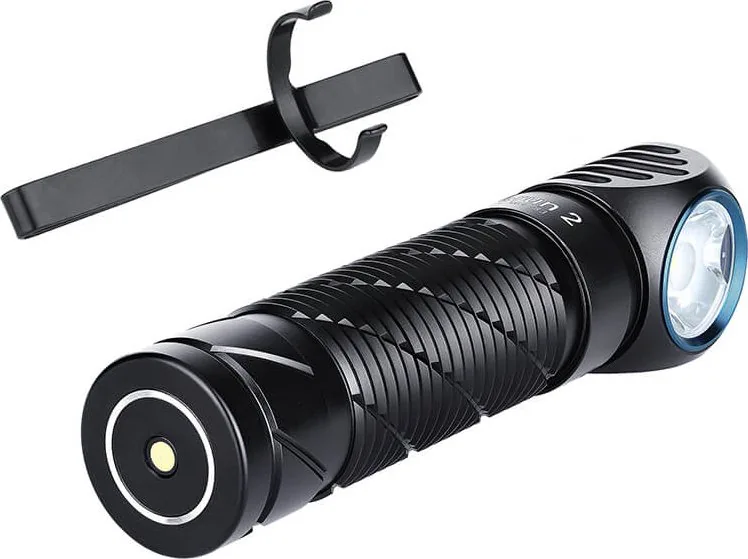
Perun 2 ( with Battery and Pocket Clip )
IN THE BOX
Lanyard
with A Pin Tool
USB Magnetic
Charging Cable
Headband With
Silicone Bracket
PRODUCT OVERVIEW
BEFORE FIRST USE
Magnetic Tail
Switch
Lanyard HolePocket Clip
Built-in Sensor
TIR Optic Lens
CHARGING
RED
Charging
GREEN
Charging Completed
USB Magnetic
Charging Cable
Insulating lm
Unscrew
Lens protective lm
Remove the protective film from the lens, unscrew the body
and remove the yellow insulating film.
ATTENTION
2: Pay attention to protect the lens from scratches. Scratches
on the surface of the lens will reduce the luminous flux. In
severe cases, it will affect the internal sensor performance,
resulting in the failure of high and above modes.
1: Please keep the surface of the lens clean. Stains or water
mist will affect the performance of the built-in sensor
located in the black area, resulting in the failure of high
and above modes, please erase in time.
Built-in Sensor
USER MANUAL
Thank you for purchasing this Olight Product.
Please read this manual carefully before use
and keep it for future reference!
USB MAGNETIC CHARGING CABLE -- MCC3
ParameterSpecication
Charging cable
USB type A - magnetic charging
connector, length: 0.5m
USB A - Type DC 5V 2A
Input
CC&CV
Charging pattern
2A
Maximum charging
current
4.2V±0.05V
Voltage of fully
charged battery
Time to fully charge
Charge indication
Red:charging
Green: full (over 95%) or
disconnected with flashlight
3.5 hours
* All performance measurements in accordance with ANSI/NEMA
FL1-2009 standards. The tests are performed using the battery
included in the flashlight, and are measured indoors under a room
temperature of 25 degrees Celsius with windless conditions.
*The runtime of turbo and high modes may vary depending on the
external temperature and ventilation conditions, these biases may
affect the results of testing.
1.5m
(L)4.75 x (D)1.13in
(L)120.7 x (D)28.6mm
161g / 5.68oz
(Including Battery)
IPX8
166
m
6889
cd
TURBO
74
m
1369
cd
HIGH
36
m
324
cd
MEDIUM
18
m
81
cd
LOW
MEDIUM
120 lumens
30 lumensLOW
5 lumensMOON
HIGH
12.5days
TURBO2500 lumens
100%
66h
18h
100%
130mins
240mins
30mins
45mins
2mins
32%
20%
54%
500 lumens
100%
4th Floor, Building 4, Kegu Industrial Park, No 6
Zhongnan Road, Changan Town, Dongguan City,
Guangdong, China.
Made in China
E. 06, 10, 2021
3.0629.6010.9004
Dongguan Olight E-Commerce Technology Co., Ltd
/1
%
Snelle check
Ik ben geen robot
Onjuist antwoord, probeer opnieuw.
Chat met je Olight Perun 2-handleiding via AI
Krijg direct AI-antwoorden uit je Olight Perun 2-handleiding
Vraag alles over Olight Perun 2. Antwoorden komen uit deze handleiding, met de pagina's waarop ze zijn gebaseerd.
Stel eenVraag
0/1000
Beveel je Perun 2 aan?
JaNee
Veelgestelde
Vragen
A
Wanneer de lamp ontgrendeld is, drukt u eenmaal op de zijknop om hem in of uit te schakelen.
Is dit antwoord nuttig?
A
Houd, terwijl de lamp aan is, de zijknop ingedrukt. Laat deze los wanneer maanlicht, laag, gemiddeld, hoog of de gewenste beschikbare modus is geselecteerd.
Is dit antwoord nuttig?
A
Dubbelklik snel op de zijknop om Turbo te activeren. Dubbelklik opnieuw om Turbo te verlaten. Als Hoog de opgeslagen modus was, keert de lamp terug naar Gemiddeld.
Is dit antwoord nuttig?
A
Terwijl de lamp aan is, dubbelklikt u en houdt u de zijknop ingedrukt. Een keer knipperen selecteert de timer van 3 minuten en twee keer knipperen selecteert de timer van 9 minuten. Herhaal de handeling om van timer te wisselen.
Is dit antwoord nuttig?
A
Houd, terwijl de lamp uit is, de zijknop ongeveer twee seconden ingedrukt totdat maanlicht uitgaat. Om te ontgrendelen houdt u deze opnieuw ongeveer twee seconden ingedrukt totdat de lamp eenmaal knippert, en laat u vervolgens los.
Is dit antwoord nuttig?
A
De sensor verlaagt de helderheid wanneer hij een nabijgelegen obstructie detecteert. Als de obstructie langer dan 60 seconden blijft bestaan, schakelt de lamp uit. Houd de lens schoon voor een betrouwbare werking.
Is dit antwoord nuttig?
A
Met de meegeleverde MCC3 magnetische laadkabel en een geschikte USB-voedingsbron van 5 V 2 A duurt een volledige lading maximaal ongeveer 3,5 uur. Rood betekent opladen en groen betekent vol of bijna vol.
Is dit antwoord nuttig?
M: gpt-5.6-terra
Voordelenen
Nadelen
Voordelen
Flexibel ontwerp: gebruik hem als hoofdlamp, schuine zaklamp, vastgeklikte lamp of magnetisch gemonteerde werklamp.
Eenvoudige knopbediening biedt directe toegang tot maanlicht, Turbo, SOS, helderheidscycli, timers en vergrendeling.
Ingebouwde naderingsbeveiliging verlaagt de lichtopbrengst bij obstructies en schakelt uit na langdurige blokkering.
Magnetisch USB-opladen en de meegeleverde oplaadbare 21700-batterij bieden gemakkelijk energiebeheer.
Trilwaarschuwingen voor een lage batterij helpen gebruikers de resterende lading te controleren zonder de lamp voortdurend te bekijken.
VS
Nadelen
Turbo is mogelijk niet beschikbaar wanneer de batterijcapaciteit onder 60% daalt, waardoor de maximale lichtopbrengst beperkt is.
Vuil, vocht of krassen op de lens kunnen de naderingssensor en hogere helderheidsmodi verstoren.
De Turbo-stand kan warmte produceren, vooral in warme omgevingen of bij langdurig gebruik.
Voor opladen is de voorgeschreven MCC3 magnetische kabel nodig; andere magnetische USB-kabels zijn niet compatibel.
Beschermde 21700-batterijen van andere merken kunnen in noodgevallen werken, maar kunnen niet in de lamp worden opgeladen.
M: gpt-5.6-terra
Product
Specificatie
Type
Hoofdlamp
Maximale lichtopbrengst
2.500 lm
Minimale lichtopbrengst
30 lm
Lichtbundelafstand
166 m
Maximale gebruiksduur
47,5 u
Minimale gebruiksduur
6 min
Lichtstanden
4
Lengte
12,09 cm
Gewicht
161 g
Kenmerken
waterdicht (IPX8), oplaadbaar, USB, SOS-signaal
M: gpt-5.6-terra
Product
Beschrijving
Handleiding voor de OLight Perun 2 hoofdlamp: een veelzijdige lamp voor handsfree werk
De OLight Perun 2 hoofdlamp is een compacte oplaadbare lamp, ontworpen voor mensen die betrouwbare verlichting nodig hebben zonder hun handen te gebruiken. Hij kan in de meegeleverde hoofdband worden gedragen, aan uitrusting worden geklikt of als schuine handlamp worden gebruikt, waardoor hij geschikt is voor wandelen, reparaties, kamperen, noodsets en dagelijkse taken. De magnetische achterkant biedt ook praktische bevestigingsmogelijkheden op geschikte metalen oppervlakken.
Dit overzicht van de handleiding voor de OLight Perun 2 hoofdlamp richt zich op de bediening en beschermende functies die de lamp eenvoudig in gebruik maken. Een enkele druk schakelt het apparaat in of uit wanneer het ontgrendeld is. Door de zijknop ingedrukt te houden, bladert u door de standaardstanden laag, gemiddeld en hoog. De maanlichtmodus is beschikbaar door de knop langer dan een seconde ingedrukt te houden terwijl de lamp uit is, en biedt een subtiele optie voor gebruik op korte afstand.
Voor direct hoog vermogen dubbelklikt u op de knop om de Turbomodus te openen. Nogmaals dubbelklikken keert terug naar de eerder opgeslagen instelling, hoewel Turbo terugkeert naar gemiddeld als hoog de opgeslagen stand was. Een snelle drievoudige klik activeert de SOS-modus voor signalering. De lamp onthoudt de instellingen voor maanlicht, laag, gemiddeld en hoog, zodat gebruikers kunnen terugkeren naar een favoriete dagelijkse helderheid.
De Perun 2 heeft ook automatische uitschakeltimers van 3 en 9 minuten. Terwijl de lamp aan is, dubbelklikt u en houdt u de knop ingedrukt om de timerselectie te openen. Een keer knipperen geeft de korte timer aan, terwijl twee keer knipperen de langere timer aangeeft. Dit is vooral nuttig bij gebruik van de hoofdlamp in een tent, tijdens het lezen of om batterijvermogen te besparen.
Veiligheid en gemak staan centraal in het ontwerp. Een knopvergrendeling voorkomt onbedoelde activering tijdens opslag of transport. De ingebouwde naderingssensor verlaagt de helderheid wanneer er dichtbij een obstructie wordt gedetecteerd en schakelt de lamp uit als de blokkade langer dan 60 seconden aanhoudt. Houd de lens schoon en vrij van krassen, aangezien vuil, vocht of schade de prestaties van de sensor kunnen beinvloeden.
Opladen gebeurt via de meegeleverde MCC3 USB-magnetische laadkabel en de inbegrepen aangepaste oplaadbare 21700-batterij. Een rood laadlampje geeft aan dat het opladen bezig is, terwijl groen een volle of bijna volle lading aangeeft. Onder geschikte stroomomstandigheden duurt het opladen maximaal ongeveer 3,5 uur.
Opmerkingen
Laad de hoofdlamp voor het eerste gebruik volledig op en verwijder de isolatie- en lensbeschermfolies.
De lamp trilt elke 30 seconden bij minder dan 10% batterijcapaciteit, behalve in de maanlichtmodus.
Richt de lichtbundel niet rechtstreeks in ogen en gebruik Turbo voorzichtig bij warme omstandigheden.
Draai voor langdurige opslag of transport de behuizing iets los om het circuit los te koppelen.