G Operating instruction D Bedienungsanleitung F Mode d‘emploi E Instrucciones de uso I Istruzioni per l‘uso
N Gebruiksaanwijzing
Alllistedbrands are tradema rksohe correspo nding
companies. Er rors andomissions except ed,
andsubject to technical chan ges. Ourgeneralterms of
deliv eryand paymentare applied.
USB-Hub
00
200101
USB Hub
1. Pa ckage Contents
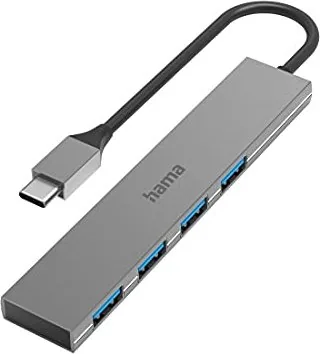
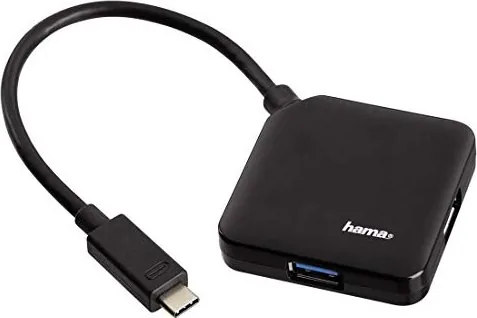
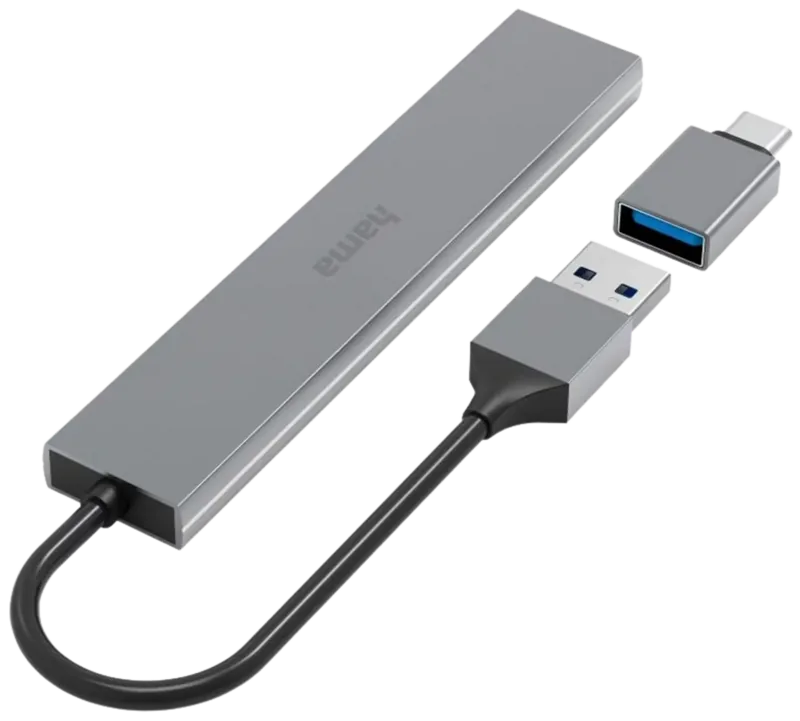
•USB-C Hub
•These operating instructions
2. Safety Notes
•Donot attempt to service or re pair the product yourself.Leave any and
all service work to quali ed experts.
•Donot open the device or continue to operate it if it becomes
damaged.
•Donot operate the product outside the power limits given in the
speci cations.
•Donot modify the product in any way.Doing so voids the warranty.
•Keep this product, as all electrical products, out of the re ach of
children!Use the product for its intended purpose only.
•Protect the product from dirt, moistureand overheating, and only use
it in adry environment.
•The product is intended for indoor use only.
•Donot use the product in the immediate vicinity of heaters or other
heat sources or in direct sunlight.
•Donot use the product in moist environments and avoid splashes.
•Donot use the product in areas wherethe use of electronic devices is
not permitted.
•Donot drop the product and do not expose it to any major shocks.
•Dispose of packaging material immediately according to locally
applicable re gulations.
Warning
•Find out the maximum output current capacity of the USB port on
your device. To do this, consult the operating instructions or ask the
manufacturer
•Common values are500 mA for USB-A2.0, 900 mA for USB-A3.0,
and up to 3000 mA for USB-C.
•Ensurethat the cumulative current draw of all USB devices
connected to the hub/multiport adaptor does not exceed this value.
3. St artup and Operation
•Switch on your computer and boot the system.
•Connect the product to afreeUSB port on your computer
•You donot have to install drivers; the computer willautomatically
recognise the product.
•Ifnecessary,follow the instructions for your operating system.
•Inorder to use your devices, plug them into the product one after
the other
4. Wa rranty Disclaimer
Hama GmbH &CoKGassumes no liability and provides no warranty for
damage re sulting from improper installation/mounting, improper use of
the product or from failuretbserve the operating instructions and/
or safety notes.
5. Te chnical Data
Operating voltage /current
consumption
5V max. 3A
Compatibility USB-C port
System re quir
Windows 10 /8/7
Mac OS 10.8 ≥
USB speci cation USB 3.2 Gen1
Note
•Ifthereinterference or the product no longer re sponds, unplug
the product, wait afew seconds and then plug it in again.
1. Pa ckungsinhalt
•USB-C Hub
•Diese Bedienungsanleitung
2. Sicherheitshinweise
•Versuchen Sie nicht, das Produkt selbst zu warten oder zu re parieren.
Überlassen Sie jegliche Wa rtungsarbeit dem zuständigen Fa chpersonal.
•Öffnen Sie das Produkt nicht und betreiben Sie es bei Beschädigungen
nicht weiter
•Betreiben Sie das Produkt nicht außerhalb seiner in den technischen
Daten angegebenen Leistungsgrenzen.
•Nehmen Sie keine Ve ränderungen am Gerät vor.Dadurch verlieren sie
jegliche Gewährleistungsansprüche.
•Dieses Produkt gehört, wie alle elektrischen Produkte, nicht in
Kinderhände!
•Verwenden Sie das Produkt ausschließlich für den dazu vorgesehenen
Zweck.
•Schützen Sie das Produkt vor Schmutz, Fe uchtigkeit und Überhitzung
und verwenden Sie es nur in trockenen Räumen.
•Das Produkt ist nur für den Gebrauch innerhalb von Gebäuden
vorgesehen.
•Betreiben Sie das Produkt nicht in unmittelbarer Nähe der Heizung,
anderer Hitzequellen oder in direkter Sonneneinstrahlung.
•Verwenden Sie das Produkt nicht in einer feuchten Umgebung und
vermeiden Sie Spritzwasser
•Benutzen Sie das Produkt nicht in Bereichen, in denen elektronische
Produkte nicht erlaubt sind.
•Lassen Sie das Produkt nicht fallen und setzen Sie es keinen heftigen
Erschütterungen aus.
•Entsorgen Sie das Ve rpackungsmaterial sofort gemäß den örtlich
gültigen Entsorgungsvorschriften.
Warnung
•Stellen Sie den maximalen Ausgangsstrom der USB-Buchse ihres
Gerätes fest. Sehen Sie dazu in der Bedienungsanleitung nach bzw.
wenden Sie sich an den Hersteller
•Häu gbetragen die We rte 500 mA (USB-A2.0), 900 mA (USB-A3.0)
oder bis zu 3000 mA (USB-C).
•Stellen Sie sicher,dass die gesamte Stro maufnahme aller an den
Hub/Multiport-Adapter angeschlossenen USB-Geräte den ermittelten
Wert nicht überschreitet.
3. Inbetriebnahme und Betrieb
•Starten Sie ihren Computer und fahren Sie ihn komplett hoch.
•Schließen Sie das Produkt an einer freien USB-Buchse Ihres Computers
an.
•Das Produkt wirdautomatisch erkannt, eine Tr eiberinstallation ist
nicht nötig.
•FolgenSie ggf.den Anweisungen Ihres Betriebsystems.
•Stecken Sie nacheinander die Geräte am Produkt an, um diese nutzen
zu können.
4. Haftungsausschluss
Die Hama GmbH &Cbernimmt keinerlei Haftung oder
Gewährleistung für Schäden, die aus unsachgemäßer Installation,
Montage und unsachgemäßem Gebrauch des Produktes oder
einer Nichtbeachtung der Bedienungsanleitung und/oder der
Sicherheitshinweise re sultieren.
5. Te chnische Daten
Betriebsspannung/
Stromaufnahme
5V max. 3A
Kompatibilität USB-C Anschluss
Systemvoraussetzung
Windows 10 /8/7
Mac OS 10.8 ≥
USB-Spezi kation USB 3.2 Gen1
Hinweis
•Stecken Sie das Produkt ab, warten Sie einige Sekunden und stecken
Sie das Produkt wieder ein, wenn eine St örung vorliegt oder das
Produkt nicht mehr re agiert.
1. Contenu de l‘emballage
•Hub USB-C
•Mode d‘emploi
2. Consignes de sécurité
•Netentez pas de réparer l’appareil vous-même ni d’effectuer
des travaux d’entretien. Déléguez tous travaux d‘entretien àdes
techniciens quali és.
•Netentez pas d‘ouvrir le produit en cas de détérioration et cessez de
l’utiliser
•N‘utilisez pas le produit en dehors des limites de puissance indiquées
dans les caractéristiques techniques.
•N’apportez aucune modi cation àl’appareil. Des modi cations vous
feraient perdrevos droits de garantie.
•Cet appareil, comme tout appareil électrique, doit êtregardé hors de
portée des enfants !
•Utilisez le produit exclusivement conformément àsadestination.
•Protégez le produit de toute saleté, humidité, surchauffe et utilisez-le
uniquement dans des locaux secs.
•Ceproduit est destiné àune utilisation exclusivement àl‘intérieur d‘un
bâtiment.
•N’utilisez pas le produit àproximité immédiate d‘un chauffage,
d’autres sources de chaleur ou exposé aux ra yons directs du soleil.
•N‘utilisez pas le produit dans un environnement humide et évitez toute
projection d‘ eau.
•N‘utilisez pas le produit dans les zones dans lesquelles l‘utilisation
d‘appar électroniques est interdite.
•Protégez le produit des secousses violentes et évitez tout choc ou
toute chute.
•Recyclez les matériaux d’emballage conformément aux prescriptions
locales en vigueur
Avertissement
•Véri ez le courant de sortie maximal du port USB de votreappareil.
Consultez le mode d’emploi de votreappareil àcujet ou adressez-
vous au fabricant de l’appareil.
•Les données sont généralement les suivantes :500 mA (USB-A2.0),
900 mA (USB-A3.0) ou jusqu’à 3000 mA (USB-C).
•Assurez-vous que la consommation totale de courant de tous les
appareils USB branchés au concentrateur /àl’adaptateur multiport
ne dépasse la valeur détectée.
3. Mise en service et fonctionnement
•Mettez votreordinateur sous tension et démarrez le système
d’exploitation.
•Connectez le produit àuort USB libredvotr eordinateur.
•Votre système re connaît automatiquement le produit ;aucun pilote ne
doit êtreinstallé.
•Lecas échéant, suivez les indications de votresystème d’exploitation.
•Branchez vos appareils au produit l’un après l’ autreande les utiliser.
4. Exclusion de garantie
La société Hama GmbH &Cécline toute re sponsabilité en cas
de dommages provoqués par une installation, un montage ou une
utilisation non conformes du produit ou encoreprovoqués par un non
respect des consignes du mode d‘emploi et/ou des consignes de sécurité.
5. Caractéristiques techniques
Tension de service /Consomma-
tion électrique
5V max. 3A
Compatibilité Connexion USB-C
Con guration re quise
Windows 10 /8/7
Mac OS 10.8 ≥
Spéci cation USB USB 3.2 Gen1
Remarque
•Débranchez le produit, patientez quelques secondes, puis
rebranchez-le en cas de problème ou dans le cas où le produit ne
réagit plus.
1. Contenido del paquete
•Hub USB-C
•Estas instrucciones de manejo
2. Instrucciones de seguridad
•Nointente mantener oreparareparato por cuenta propia.
Encomiende cualquier trabajo de mantenimiento al personal
especializado competente.
•Noabraeroducto ynsiga operando de presentar deterioros.
•Noopereeroducto fuerados límites de potencia indicados en los
datos técnicos.
•Norealice cambios en el aparato. Esto conllevaría la pérdida de todos
los derechos de la garantía.
•Este aparato, como todos los aparatos eléctricos, no debe estar en
manos de los niños.
•Emplee el producto exclusivamente paralunción paralue fue
diseñado.
•Proteja el producto de la suciedad, la humedad ye
sobrecalentamiento yutilícelo sólo en re cintos secos.
•Elproducto está diseñado sólo paraeso dentroddi cios.
•Noopereeroducto en las inmediaciones de la calefacción, de otras
fuentes de calor obajo la ra diación directa del sol.
•Noutilice el producto en entornos húmedos yevite el contacto con las
salpicaduras de agua.
•Noutilice el producto en áreas donde no se permitan aparatos
electrónicos.
•Nodeje caer el producto ni lo someta asacudidas fuertes.
•Deseche el material de embalaje en conformidad con las disposiciones
locales sobreeesecho vigentes.
Aviso
•Determine la corriente de salida máxima del puerto USB de su
dispositivo. Para ello, consulte las instrucciones de uso odiríjase al
fabricante.
•Amenudo, los valores equivalen a500 mA (USB A2.0), 900 mA
(USB A3.0) oalcanzan hasta 3000 mA (USB-C).
•Asegúrese de que el consumo de corriente total de todos los
dispositivos USB conectados al hub/adaptador multipuerto no
sobrepasan el valor calculado.
3. Puesta en marcha yfuncionamiento
•Encienda su ordenador yespereaque arranque completamente.
•Conecte el producto auuerto USB libredsu ordenador
•Elproducto se reconoce automáticamente, sin necesidad de instalar
ningún controlador
•Encaso necesario, siga las instrucciones de su sistema operativo.
•Enchufe los dispositivos USB al producto de forma consecutiva para
poder utilizarlos.
4. Exclusión de re sponsabilidad
Hama GmbH &CoKGneresponsabiliza ni concede garantía por los
daños que surjan por una instalación, montaje omanejo incorrectos del
producto opor la no observación de las instrucciones de manejo y/o de
las instrucciones de seguridad.
5. Datos técnicos
Tensión de funcionamiento /
consumo de corriente
5V max. 3A
Compatibilidad Puerto USB-C
Requisitos del sistema
Windows 10 /8/7
Mac OS 10.8 ≥
Especi cación USB USB 3.2 Gen1
Nota
•Encaso de fallo odue el producto deje de re accionar,desenchufe
el producto, esperealgunos segundos yvuelva aenchufarlo.
1. Contenuto della confezione
•Hub USB-C
•Queste istruzioni per l’uso
2. Indicazioni di sicurezza:
•Non tentaredggiustareoripararel’apparecchio da soli. Fare
eseguirequalsiasi lavorodiparazione al personale specializzato
competente.
•Non aprireirodotto enon utilizzarlo più se danneggiato
•Non mettereisercizio il prodotto al di fuori dei suoi limiti di
rendimento indicati nei dati tecnici.
•Non apportaremodi che all’apparecchio per evitarederdereidiritti
di garanzia.
•Tenerequesto apparecchio, come tutte le apparecchiatureelettriche,
fuori dalla portata dei bambini!
•Utilizzareirodotto esclusivamente per lo scopo previsto.
•Proteggereirodotto da sporcizia, umidità esurriscaldamento e
utilizzarlo solo in ambienti asciutti.
•Ilprodotto èstato concepito solo per l‘utilizzo all‘interno degli edi ci.
•Evitaredettereisercizio il prodotto in prossimità di
riscaldamento, altrefonti di caloreoluce diretta del sole.
•Non usareirodotto in ambienti umidi ed evitareiontatto con gli
spruzzi.
•Non utilizzareirodotto in zone in cui non sono ammesse le
apparecchiatureelettroniche.
•Non farecadereirodotto enon sottoporlo aforti scossoni!
•Smaltireimmediatamente il materiale d‘imballaggio attenendosi alle
prescrizioni locali vigenti.
Attenzione
•Veri carelorrente in uscita massima del connettoreUSB del
proprio dispositivo. Consultarelistruzioni orivolgersi al produttore.
•Spesso ivalori sono di 500 mA (USB-A2.0), 900 mA (USB-A3.0)
oppure no a3000 mA (USB-C).
•Accertarsi che l’assorbimento totale di energia di tutti idispositivi
USB collegati all’hub/adattatoremultiport non superi il valore
stabilito.
3. Messa in esercizio efunzionamento
•Accendere il computer eavviarlo.
•Collegareirodotto auna porta USB liberadel computer
•Ildispositivo viene riconosciuto automaticamente, non ènecessario
installarealcun driver
•Attenersi, se necessario, alle istruzioni del proprio sistema operativo.
•Per poter utilizzareidispositivi, collegarli in sequenza.
4. Esclusione di garanzia
Hama GmbH &Co.KGnon si assume alcuna re sponsabilità per idanni
derivati dal montaggio ol‘utilizzo scorretto del prodotto, nonché dalla
mancata osservanza delle istruzioni per l‘uso e/o delle indicazioni di
sicurezza.
5. Dati tecnici
Tensione di esercizio /Corrente
assorbita
5V max. 3A
Compatibilità Attacco USB-C
Requisiti minimi di sistema
Windows 10 /8/7
Mac OS 10.8 ≥
Speci ca USB USB 3.2 Gen1
Avvertenza
•Inpresenza di un guasto osrodotto non reagisce più, scollegare
il prodotto, attenderealcuni secondi ecollegarlo nuovamente.
1. Inhoud van de verpakking
•USB-C hub
•Deze bedieningsinstructies
2. Ve iligheidsinstructies
•Probeer niet het product zelf te onderhouden of te repareren.
Laat onderhouds- en re paratiewerkzaamheden door vakpersoneel
uitvoeren.
•Open het product niet en gebruik het niet meer als het beschadigd is.
•Gebruik het product niet buiten de in de technische gegevens vermelde
vermogensgrenzen.
•Verander niets aan het toestel. Daardoor vervalt elke aanspraak op
garantie.
•Elektrische apparaten dienen buiten het bereik van kinderen gehouden
te worden!
•Gebruik het product uitsluitend voor het doel waarvoor het gemaakt is.
•Bescherm het product tegen vuil, vocht en oververhitting en gebruik
het alleen in droge omgevingen.
•Het product is uitsluitend bedoeld voor gebruik binnen gebouwen.
•Gebruik het product niet in de onmiddellijke nabijheid van een
verwarming of anderewarmtebronnen en stel het niet bloot aan
directe zonnestralen.
•Gebruik het product niet in een vochtige omgeving en voorkom spat-
en spuitwater
•Gebruik het product niet binnen omgevingen, waarin elektronische
apparatuur niet is toegestaan.
•Laat het product niet vallen en stel het niet bloot aan zwareschokken
of stoten.
•Het verpakkingsmateriaal direct en overeenkomstig de lokaal geldende
afvoervoorschriften afvoeren.
Waarschuwing
•Bepaal de maximale waarde van de uitgaande stroom van de
USB-poort van uw apparaat. Dit kunt uide bedieningsinstructies
vinden of ukunt contact opnemen met de fabrikant.
•Vaakbedragen de waarden 500 mA (USB-A2.0), 900 mA (USB-A
3.0) of max. 3000 mA (USB-C).
•Controleer of het totale stroomverbruik van alle op de hub/
multiport-adapter aangesloten USB-apparaten niet meer dan de
vastgestelde waarde bedraagt.
3. Ingebruikneming en werking
•Start uw computer helemaal op.
•Sluit het product op een vrije USB-poort van uw computer aan.
•Het product wordt automatisch herkend, het installeren van een driver
is niet nodig.
•Volgevt. de aanwijzingen van uw besturingssysteem op.
•Sluit achtereenvolgens de toestellen op het product aan om deze te
kunnen gebruiken.
4. Uitsluiting van garantie en aansprakelijkheid
Hama GmbH &CoKGaanvaardt geen enkele aansprakelijkheid of
garantieclaims voor schade of gevolgschade, welke door ondeskundige
installatie, montage en ondeskundig gebruik van het product
ontstaan of het re sultaat zijn van het niet in acht nemen van de
bedieningsinstructies en/of veiligheidsinstructies.
5. Te chnische speci caties
Bedrijfsspanning /stroom-
verbruik
5V max. 3A
Compatibiliteit USB-C aansluiting
Systeemvereisten
Windows 10 /8/7
Mac OS 10.8 ≥
USB-Spezi kation USB 3.2 Gen1
Aanwijzing
•Koppel het product los, wacht uenige seconden en sluit uhet
product weer aan, indien er zich een storing voordoet of het product
niet meer re ageert.
00200101/03.20
Hama GmbH &CoK
86652 Monheim/Germany
Service &Support
www
+49 9091 502-0
DG
E
SK
F
D
GB
I
S
PL
RUS
H
BG
CZ
TR
FIN
RO
GR
NL
P
Operating Instructions
Bedienungsanleitung
Mode d‘e mploi
Instrucciones de uso
Gebruiksaanwijzing
Istruzioni per l‘uso
Instrukcja obsł ugi
Használati útmutató
Manual de utilizare
Návod kpoužití
Návod na použitie
Manual de instruções
Bruksanvisning
Руководство по эксплуата ции
Работна инструкция
Οδηγίες χρήσης
Kullanma kı lavuzu
Käyttöohje
1. Zawartość opakowania
•Koncentrator USB-C
•Niniejsza instrukcja obsł ugi
2. Wskazówki bezpieczeń stwa
•Nie próbować naprawiać samodzielnie urzą dzenia. Prace serwisowe
zlecać wykwali kowanemu personelowi fachowemu.
•Nie otwierać produktu inie uż ywać go, gdy jest uszkodzony
•Nie stosować produktu poza zakresem mocy podanym wdanych
technicznych.
•Nie mody kować urzą dzenia. Prowadzi to do utraty wszelkich ro szczeń
ztytuł ugwarancji.
•Trzymać urzą dzenie, jak wszystkie urzą dzenia elektryczne, zdala od
dzieci!
•Stosować produkt wyłą cznie zgodnie zprzewidzianym przeznaczeniem.
•Chronić produkt przed zanieczyszczeniem, wilgocią iprzegrzaniem oraz
stosować go tylko wsuchym otoczeniu.
•Produkt jest przeznaczony wyłą cznie do uż ytku wewną trz budynków
•Nie uż ywać produktu wbezpoś re dniej bliskoś ci ogrzewania, innych
źróde ł ciep łaani nie wystawiać go na bezpoś re dnie promieniowanie
sł oneczne.
•Nie stosować produktu wwilgotnym otoczeniu ichronić go przed
bryzgami wody
•Nie uż ywać produktu wmiejscach, gdzie nie jest dozwolone
stosowanie urzą dzeń elektronicznych.
•Chronić produkt przed upadkiem isilnymi wstrzą sami.
•Materiał yopakowaniowe należ ynatychmiast poddać utylizacji zgodnie
zobowią zują cymi przepisami miejscowymi.
Ostrzeż enie
•Ustalić maksymalny prą dwyjś ciowy gniazda USB urzą dzenia. W
tym celu znaleźć odpowiednie informacje winstrukcji obsł ugi lub
skontaktować się zproducentem.
•Cęsto wartoś ci wynoszą 500 mA (USB-A2.0), 900 mA (USB-A3.0)
lub nawet 3000 mA (USB-C).
•Zadbać oto, aby cał kowity pobór prą du wszystkich podłą czonych
do koncentratora/adapteraMultiport urzą dzeń USB nie przekroczył
ustalonej wartoś ci.
3. Uruchamianie iobsł uga
•Uruchomić komputer iodczekać do momentu cał kowitego
zał adowania systemu.
•Podłą czyć produkt do wolnego portu USB komputera.
•Produkt jest automatycznie ro zpoznawany,nie jest konieczna instalacja
sterowników
•Ewentualnie postę pować zgodnie zinstrukcjami systemu operacyjnego.
•Wcelu korzystania zurzą dzeń podłą czyć je kolejno do produktu.
4. Wyłą czenie odpowiedzialnoś ci
Hama GmbH &CoKGnie udziela gwarancji ani nie odpowiada za
szkody wskutek niewł aś ciwej instalacji, montaż uoraznieprawidł owego
stosowania produktu lub nieprzestrzegania instrukcji obsł ugi i/lub
wskazówek bezpieczeń stwa.
5. Dane techniczne
Napię cie ro bocze /pobór prą du 5V max. 3A
Kompatybilność Port USB-C
Wymagania systemowe
Windows 10 /8/7
Mac OS 10.8 ≥
Specy kacja USB USB 3.2 Gen1
Wskazówki
•Jżeli wystą pi usterka lub produkt przestanie re agować ,należ y
odłą czyć produkt, odczekać kilka sekund ipodłą czyć go ponownie.
1. Acsomag tartalma
•USB-C hub
•Ezahasználati útmutató
2. Biztonsági elő írások:
•Nekísérelje meg akészülék saját karbantartását vagy javítását.
Bármely karbantartási munkát bízzon illetékes szakemberre.
•Nenyissa ki aterméket és sérülés esetén ne üzemeltesse tovább.
•Neüzemeltesse aterméket aműszaki adatokban megadott
teljesítményhatárain túl.
•Nevégezzen módosítást akészüléken. Ebben az esetben minden
garanciaigény megszű nik.
•Ezakészülék, mint minden elektromos készülék, nem gyermekek
kezébe való!
•Aterméket kizárólag az elő írt célrahasználja.
•Óvja meg aterméket szennyező déstő l, nedvességtő lé
túlmelegedéstő l, és kizárólag zárt környezetben használja.
•Atermék csak épületen belüli használatrakészül.
•Aterméket ne használja afűtés és egyéb hő források közelében, vagy
közvetlen napsütésnek kitéve.
•Nehasználja aterméket párás környezetben, és kerülje az érintkezést
fröccsenő vízzel.
•Nehasználja aterméket olyan helyen, ahol elektronikus készülékek
nincsenek megengedve.
•Neejtse le aterméket és ne tegye ki heves rázkódásnak.
•Azonnal ártalmatlanítsa acsomagolóanyagot ahelyileg érvényes
ártalmatlanítási elő írások szerint.
Figyelmeztetés
•Állapítsa meg készüléke USB csatlakozójának kimeneti áramát.
Ehhez olvassa el ahasználati utasítást, vagy forduljon agyártóhoz.
•Azértékek leggyakrabban 500 mA (USB-A2.0) 900 mA (USB-A3.0)
vagy 3000 mA (USB-C).
•Gőződjön meg róla, hogy valamennyi, ahubra/multiport adapterre
csatlakoztatott USB készülék össz-áramfogyasztása nem haladja
meg amegadott értéket.
3. Üzembevétel és üzemeltetés
•Kapcsolja be számítógépét és várja meg az operációs re ndszer teljes
betöltő dését.
•Csatlakoztassa aterméket aszámítógépe egyik szabad USB portjára.
•Atermék felismerése automatikus, meghajtóprogram telepítése nem
szükséges.
•Adott esetben kövesse operációs re ndszerének utasításait.
•Dugaszolja az készülékeket egymás után atermékbe, hogy ezeket
használhassa.
4. Szavatosság kizárása
AHama GmbH &Cemmilyen felelő sséget vagy szavatosságot nem
vállal atermék szakszerű tlen telepítésébő l, szerelésébő lézakszerű tlen
használatából, vagy akezelési útmutató és/vagy abiztonsági elő írások
be nem tartásából eredő károkért.
5. Mű szaki adatok
Üzemi feszültség /Áramfelvétel 5V max. 3A
Kompatibilitás USB-C csatlakozó
Rendszerkövetelmény
Windows 10 /8/7
Mac OS 10.8 ≥
USB-Spezi kation USB 3.2 Gen1
Hivatkozás
•Húzza ki aterméket, várjon pár másodpercet és csatlakoztassa ismét
aterméket, ha zavar áll fenn, vagy atermék nem re agál többé.
1. Conț inutul pachetului
•Hub USB-C
•Acest manual de utilizare
2. Instrucț iuni de siguranță
•Nuîncercaţ isăreparaţ isau să depanaţ iaparatul. Operaţ iile de
reparaţ ii se execută numai de personal de specialitate.
•Nudeschideț iprodusul ș inu-l utilizaț iîontinuareîcaz de
deterioare.
•Nuexploataţ iprodusul în afaralimitelor de putereindicate în datele
tehnice.
•Nuexecutaţ imodi că ri la aparat. În acest fel pierdeţ iorice drept la
garanţ ie.
•Acest aparat, ca de altfel toată aparaturaelectronică ,narecăuta
în mâinile copiilor!
•Folosiț iprodusul numai în scopul pentru careafost conceput.
•Protejaţ iprodusul de impurităţ i, umiditate, supraîncă lzire ş iutilizaţ i-l
numai în mediu uscat.
•Produsul este conceput numai pentru utilizarea în interiorul clă dirilor
•Evitaţ ifolosirea produsului în imediata apropiereasistemului de
încă lzire, aaltor surse de că ldură sau în ra diaț ia solară directă .
•Nufolosiț iprodusul în mediu umed ș ievitaț istropirea cu apă .
•Nufolosiţ iprodusul în zone unde nu sunt admise aparate electronice.
•Nulăsaț iprodusul să cadășinupuneț itrepidaț iilor puternice.
•Reciclarea materialului pachetului se execută comform normelor locale
de salubrizareîigoare.
Avertizare
•Determinaț iintensitatea maximă de ieș irearacordului USB la
aparat. Ve ri caț ivaloarea obț inută cu cea din manualul de
funcț ionarerespectiv adresaț i-vă producă torului.
•Valorile pot de 500 mA (USB-A2.0), 900 mA (USB-A3.0) sau până
la 3000 mA (USB-C).
•Asiguraț i-vă ca consumul de curent al aparatelor USB conectate la
Hub/adaptor Multiport să nu depăș ească valoarea determinată .
3. Punereîuncț iune ș iexploatare
•Porniț icalculatorul ș istartaț icomplet programele iniț iale.
•Conectaț iprodusul la un port USB liber al calculatorului.
•Produsul este re cunoscut automat, instalaredriverenste
necesară .
•Dacă este cazul urmaț iinstrucț iunile sistemului de funcț ionare.
•Pentru folosirea aparatelor USB sau amediilor de memorare,
conectaț i-le consecutiv la produs.
4. Excluderedaranț ie
Hama GmbH &Cuîşiasumă nici orăspunderesau garaț ie pentru
pagube cauzate de montarea, instalarea sau folosirea necorespunză toare
aprodusului sau nerespectarea instrucț iunilor de folosiresau/ș ia
instrucț iunilor de siguranță .
5. Date tehnice
Tensiune de funcț ionare/
Consum de curent
5V max. 3A
Compatibilitate Po rt USB-C
Cerinț edesistem
Windows 10 /8/7
Mac OS 10.8 ≥
Speci caț ie USB USB 3.2 Gen1
Instrucț iune
•Dacă observaț iodefecț iune sau produsul nu mai re acț ionează ,
deconectaț i-l, aș teptaț icâteva secunde ș iconectaț i-l din nou.
P Instrukcja obsł ugi H Használati útmutató M Manual de utilizare




Lena K
4 maanden geleden
Kan ik met deze compacte hub vier USB-apparaten en een USB-C-aansluiting tegelijk gebruiken?
Manual.ly
4 maanden geleden
Ja, de compacte hub is ontworpen om de connectiviteit uit te breiden met vier USB-poorten en een USB-C-poort, zodat meerdere compatibele apparaten tegelijk kunnen worden aangesloten. Controleer wel of je hostapparaat de vereiste USB-C-functies ondersteunt en of aangesloten randapparatuur binnen de vermogenslimieten blijft.