
Hama Fullmotion Monitor Arm 95826 Handleiding
PDF handleiding · 22 Pagina's
Nederlands



Snelle check
Onjuist antwoord, probeer opnieuw.
Chat met je Hama Fullmotion Monitor Arm 95826-handleiding via AI
Krijg direct AI-antwoorden uit je Hama Fullmotion Monitor Arm 95826-handleiding
Vraag alles over Hama Fullmotion Monitor Arm 95826. Antwoorden komen uit deze handleiding, met de pagina's waarop ze zijn gebaseerd.
Fullmotion Onderhoudsschema
Na het monteren van het product en de belasting, controleer op voldoende stabiliteit en operationele veiligheid. Herhaal deze controle in regelmatige intervallen.
Reinig alleen met een licht vochtige, pluisvrije doek. Gebruik geen agressieve reinigingsmiddelen.
Gratis onderhoudsherinneringen
Afgestemd op uw aankoopdatum. Altijd gratis, op elk moment afmelden.
Stel eenVraag
Beveel je Fullmotion aan?
Ja NeeBeveel je Fullmotion aan?
Ja NeeVeelgestelde Vragen
Hij is ontworpen voor platte beeldschermen van 10 tot 26 inch. De maximale belasting is 10 kg, dus hij is het meest geschikt voor kleinere, lichte monitoren die voldoen aan de VESA 100x100-standaard.
Is dit antwoord nuttig?
Ja. Hij biedt veel bewegingsvrijheid, inclusief 360° rotatie, een brede kantelrange en zwenking op één scharnier. De handleiding vermeldt ook dat zijdelingse beweging geen losse schroeven vereist.
Is dit antwoord nuttig?
De installatie is eenvoudig als de monitor compatibel is, maar de handleiding raadt aan om met twee personen te monteren en af te stellen. Er wordt ook nadrukkelijk geadviseerd om vóór het begin de schroeflengte en bevestigingshardware te controleren.
Is dit antwoord nuttig?
Nee. Het product is uitsluitend bedoeld voor gebruik binnenshuis. Het is ontworpen voor thuis- of kantoorinterieurs, waar het scherm veilig kan worden gemonteerd en gebruikt binnen de opgegeven grenzen.
Is dit antwoord nuttig?
Niet altijd, maar de compatibiliteit verschilt. De meegeleverde set dekt veel gevallen, maar sommige monitoren hebben mogelijk andere schroeven of bevestigingsonderdelen uit een speciaalzaak nodig.
Is dit antwoord nuttig?
De instructies adviseren om de gemonteerde arm en belasting regelmatig te inspecteren, minstens om de drie maanden, om te zorgen dat alles veilig en stevig blijft.
Is dit antwoord nuttig?
Voordelen en Nadelen
Voordelen

- Brede bewegingsvrijheid met 360° rotatie en sterke kantelbaarheid voor comfortabel kijken.
- Ondersteunt VESA 100x100-monitoren tot 10 kg, waarmee veel compacte schermopstellingen worden gedekt.
- Zijdelingse aanpassingen kunnen worden gedaan zonder schroeven los te maken, wat dagelijkse veranderingen eenvoudiger maakt.
- Helpt bureauruimte vrij te maken en de ergonomie te verbeteren in thuis- of kantooromgevingen.
Nadelen

- Ondersteunt alleen monitoren tot 26 inch en 10 kg, waardoor grotere schermen niet geschikt zijn.
- Alleen ontworpen voor gebruik binnenshuis, zonder vermelding van buitengebruik of zware toepassingen.
- De installatie kan twee personen en compatibele extra schroeven vereisen voor sommige monitoren.
- Regelmatige veiligheidsinspecties zijn nodig, wat doorlopende onderhoudsverantwoordelijkheid toevoegt.
Product Specificatie
Type
Bureausteun
Aantal monitoren
1
Schermgrootte
10-26"
Mobiliteit
kantelbaar (-90 graden, +85 graden), draaibaar (360 graden), in hoogte verstelbaar
Max. draagvermogen
10,00 kg
VESA
75x75, 100x100
Speciale kenmerken
Kabelbeheer
Kleur
zwart
Product Beschrijving
Hama Full Motion Monitor Arm
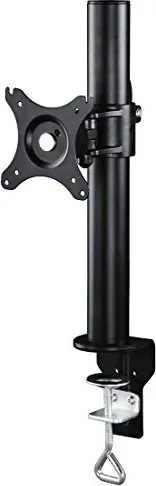
De Hama Full Motion Monitor Arm is een slimme keuze voor iedereen die een netter bureau en een flexibeler schermopstelling wil. Ontworpen voor platte beeldschermen van 10 tot 26 inch, ondersteunt hij monitoren tot 10 kg en gebruikt hij het VESA 100x100-montagepatroon. Dat maakt hem een praktische oplossing voor compacte thuiskantoren, studeerhoeken en lichte werkplekken waar ruimte en comfort belangrijk zijn.
Zijn grootste kracht is de bewegingsvrijheid. De arm biedt 360° rotatie, een brede kantelrange van -90° tot +85° afhankelijk van het scherm, en tot 360° zwenking op één scharnier. In het dagelijks gebruik helpt die flexibiliteit je scherm beter uit te lijnen voor een betere houding, content gemakkelijker te delen of gewoon een kijkhoek te vinden die natuurlijk aanvoelt. Voor mensen die lange uren aan een bureau zitten, kan dit soort afstelling echt verschil maken.
Het ontwerp richt zich ook op stabiliteit en veilig gebruik. De installatie-instructies benadrukken het belang van de juiste schroeven, compatibele bevestigingsmaterialen en een evenwichtige belasting. De meegeleverde montageset dekt veel gangbare opstellingen, maar niet elke monitor gebruikt dezelfde hardware, dus compatibiliteitscontroles zijn essentieel vóór de installatie. Bij het monteren en afstellen wordt een tweede persoon aanbevolen, wat extra vertrouwen geeft bij het hanteren van het scherm en de arm samen.
In de praktijk draait deze monitorarm om meer dan alleen het op zijn plaats houden van een scherm. Hij helpt waardevolle bureauruimte vrij te maken, houdt de werkplek opgeruimder en ondersteunt een ergonomischere opstelling. Eenmaal correct geïnstalleerd kunnen zijdelingse bewegingen worden gemaakt zonder schroeven los te maken, wat het dagelijks verstellen sneller en minder frustrerend maakt. Dat gemak is vooral handig in gedeelde ruimtes of multifunctionele omgevingen waar het scherm vaak moet worden aangepast.
Als je de Hama Full Motion Monitor Arm-handleiding bekijkt vóór het instellen, is de belangrijkste les voorbereiding. Controleer de inhoud van de verpakking, bevestig dat je monitor binnen de maat- en gewichtslimieten valt en zorg ervoor dat kabels en poorten na montage toegankelijk blijven. De handleiding adviseert ook regelmatige veiligheidscontroles, minstens elke drie maanden, om de opstelling op termijn veilig te houden. Voor gebruikers van kleine schermen die flexibiliteit waarderen, biedt de Hama-arm een eenvoudige balans tussen functionaliteit, comfort en controle.
Opmerkingen
- Alleen voor gebruik binnenshuis
- Het meest geschikt voor kleinere monitoren
- Regelmatige veiligheidscontroles worden aanbevolen
- Gebruik alleen compatibele bevestigingshardware
Zoek naar 67.732 Handleidingen online


Typ merk of model in